
Nissan Rogue Service Manual: Rear door glass
Exploded View
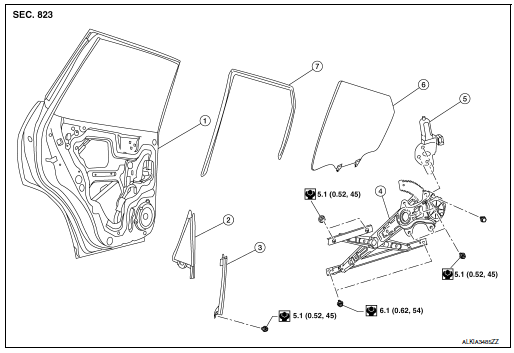
- Rear door panel
- Rear door glass corner finisher
- Rear door glass rear run channel
- Rear door glass regulator assembly
- Rear door glass power window motor
- Rear door glass
- Rear door glass rubber run channel
Removal and Installation
REMOVAL
- Remove the rear door finisher. Refer to INT-18, "Removal and Installation".
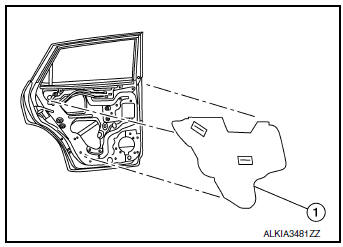
- Remove the rear door vapor barrier (1).
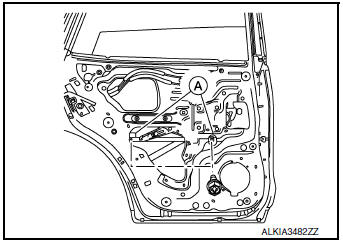
- Temporarily reconnect the rear power window switch.
- Operate the rear power window switch to raise/lower the rear door glass until the rear door glass regulator to rear door glass bolts (A) can be seen and remove.
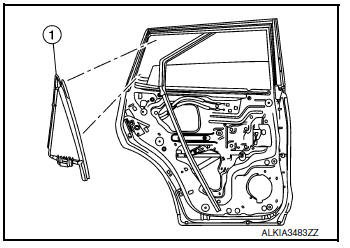
- Remove screws and rear door corner finisher (1).
- Remove the rear door glass (1).
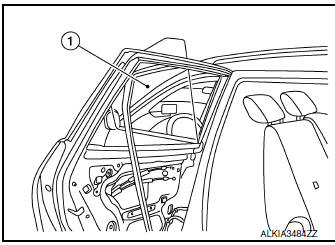
INSTALLATION
Installation is in the reverse order of removal.
CAUTION: • Tighten the rear door regulator bolts to glass specification. Refer to GW-22, "Exploded View"
FITTING INSPECTION
- Check that the rear door glass is securely fit into the rear door glass run channel.
- Lower the rear door glass slightly [approximately 10 to 20 mm (0.39 to 0.79 in)], and check that the clearance to the sash is parallel. If the clearance between the rear door glass and sash is not parallel, loosen the rear door regulator to glass bolts, rear door run channel bolts, and rear door glass bolts to correct the rear door glass position.
 Front power window motor
Removal and Installation
REMOVAL
Remove front door glass regulator. Refer to GW-16, "Removal and
Installation".
Remove screws (A) and front power window motor (1) from ...
 Rear regulator
Exploded View
Rear door panel
Rear door glass corner finisher
Rear door glass rear run channel
Rear door regulator assembly
Rear door glass power window motor
Rear door glass
& ...
Other materials:
Symptom diagnosis
THE SPORT MODE INDICATOR LAMP DOES NOT TURN ON
Description
The SPORT mode indicator lamp does not turn ON when the SPORT mode switch is
operated.
Diagnosis Procedure
1.CHECK SPORT MODE INDICATOR LAMP FUNCTION
Perform combination meter self-diagnosis mode and check test order 10. Refer
to MW ...
How to check terminal
CONNECTOR AND TERMINAL PIN KIT
Use the connector and terminal pin kits listed below when
replacing connectors or terminals.
The connector and terminal pin kits contain some of the most
commonly used NISSAN/INFINITI connectors
and terminals. For detailed connector and termin ...
Precaution
Precaution for Supplemental Restraint System (SRS) "AIR BAG" and "SEAT
BELT
PRE-TENSIONER"
The Supplemental Restraint System such as “AIR BAG� and “SEAT BELT PRE-TENSIONER�,
used along
with a front seat belt, helps to reduce the risk or severity of injury to the
...
