
Nissan Rogue Service Manual: Periodic maintenance
IN-CABIN MICROFILTER
Removal and Installation
REMOVAL
- Release the tab and remove the in-cabin microfilter cover (1)
from under the RH side of the instrument panel.
CAUTION: Use care when lifting up on the tab to avoid damaging it.
- Remove the in-cabin microfilter (2).
CAUTION: If the filter is deformed/damaged when removing, replace it with a new one. A deformed or damaged filter may affect the dust collecting performance.
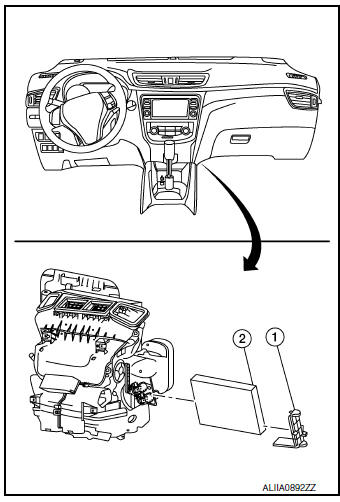
INSTALLATION
Installation is in the reverse order of removal.
CAUTION: When installing, handle the filter with extreme care to avoid deforming or damaging the filter.
 Preparation
Special Service Tool
The actual shapes of tools may differ from those illustrated here.
Tool number
(TechMate No.)
Tool name
Description
—
(J-46534)
Trim Tool Se ...
 System description
VENTILATION SYSTEM
System Description
OUTLINE
Automatic A/C
The ventilation system is controlled by the A/C switch assembly. For details
of the automatic air conditioner
system, refer to HAC-10 ...
Other materials:
Driver side door mirror defogger
Description
Heats the heating wire with the power supply from the rear window defogger
relay to prevent the door mirror
from fogging up.
Component Function Check
1. CHECK DOOR MIRROR DEFOGGER LH
Check that heating wire of door mirror defogger LH is heated when turning the
rear window defogg ...
Vehicle recovery (freeing a stuck vehicle)
FRONT
Securely install the vehicle recovery hook stored with jacking tools.
Check that the hook is properly secured in the stored place after use.
WARNING:
Stand clear of a stuck vehicle.
Never spin your tires at high speed. This could cause them to
explode and result in ser ...
P0111 IAT sensor
DTC Description
DTC DETECTION LOGIC
DTC No.
CONSULT screen terms
(Trouble diagnosis content)
DTC detecting condition
P0111
IAT SENSOR 1 B1
(Intake air temperature sensor 1 circuit
range/performance bank 1)
The comparison result of signals transmitted to ECM fro ...
