
Nissan Rogue Service Manual: Luggage room lamp
Removal and Installation
REMOVAL
- Insert a suitable tool (A) into the gap between the luggage lower
finisher (RH) (2) and the top of luggage room lamp (1) to release
the pawl.
 : Pawl
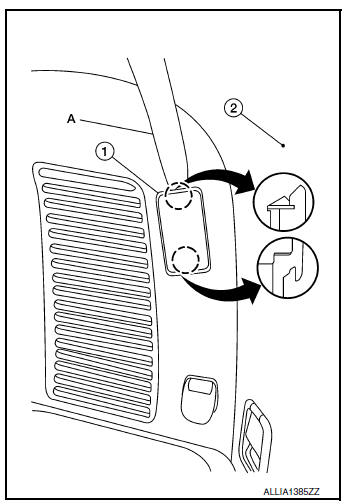
- Disconnect the harness connector from the luggage room lamp and remove.
INSTALLATION
Installation is in the reverse order of removal.
Bulb Replacement
WARNING: Do not touch the glass surface of a bulb while it is lit or right after being turned OFF to prevent burns.
CAUTION:
- Do not touch the glass of bulb directly by hand. Keep grease and other oily substances away from bulb surface.
- Do not leave bulb out of lamp reflector for a long time because dust, moisture, smoke, etc. may affect the performance of lamp.
- Remove luggage room lamp. Refer to INL-61, "Removal and Installation".
- Release pawls using a suitable tool and remove luggage room
lamp cover (1).: Pawl
- Push the tab to release one bulb end, then grasp the luggage room lamp bulb (3) and pull out the second end to remove.
- Install luggage room lamp bulb (3) to luggage room lamp (2).
- Install luggage room lamp cover (1).
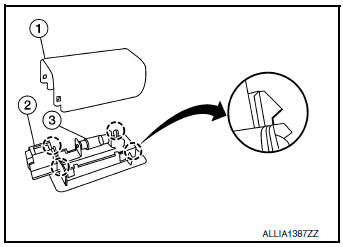
- Install luggage room lamp. Refer to Refer to INL-61, "Removal and Installation".
 Personal lamp
Removal and Installation
The personal lamp is serviced as part of headlining. Refer to INT-30,
"Removal and Installation".
Bulb or Lens Replacement
WARNING:
Do not touch the glass surf ...
 Meter control switch
Removal and Installation
REMOVAL
Remove the instrument finisher (A). Refer to IP-14, "Exploded
View".
Remove the screws (A) and the meter control switch (1).
INSTA ...
Other materials:
Remote keyless entry (if so equipped)
CAUTIONDo not leave the ignition key inside the
vehicle when you leave the vehicle.
key number plate is supplied with your keys.
Record the key number and keep it in a safe place
(such as your wallet), not in the vehicle. If you lose
your keys, see a NISSAN dealer for duplicates ...
Periodic maintenance
REAR PROPELLER SHAFT
Inspection
APPEARANCE AND NOISE
Check the propeller shaft tube surface for dents or cracks. If
malfunction is detected, replace propeller shaft
assembly.
If center bearing is noisy or damaged, replace propeller shaft
assembly.
VIBRATION
If vibrati ...
Door outside molding
Exploded View
Front door panel
Front door outside molding
Rear door panel
Rear door outside molding
Pawl
Removal and Installation
FRONT DOOR OUTSIDE MOLDING
Removal
Lower front door glass.
Remove door mirror. Refer to MIR-22, "Removal and Installa ...
