
Nissan Rogue Owners Manual: How to use the touch-screen
CAUTION
|
To help ensure safe driving, some functions cannot be operated while driving.
The on-screen functions that are not available while driving will be “grayed out� or muted.
Park the vehicle in a safe location and then operate the navigation system.
WARNING
|
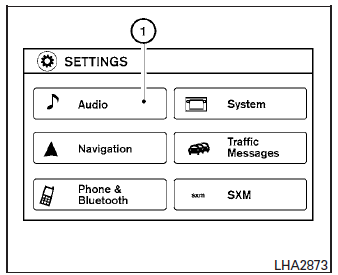
Touch-screen operation
| Menu Item | Result | |
| Selecting the item | Touch an item to select . To select the “Audio� key, touch the
“Audio� key 1 on the screen. Press the
 BACK button to
return to the previous screen. BACK button to
return to the previous screen. |
|
| Adjusting the item | Touch the “+� key or the “ � key to adjust the settings of an item. Touch the up arrow to scroll up the page one item at a time, or touch the double up arrow to scroll up an entire page. Touch the down arrow to scroll down the page one item at a time, or touch the double down arrow to scroll down an entire page. | |
| Inputting characters | Touch the letter or number key. There are some options available when inputting characters. | |
| 123/ABC | Changes the available character set to numbers. | |
| Space | Inserts a space. | |
| Delete | Deletes the last inputted character with one touch. Touch and hold the “Delete� key to delete all of the characters. | |
| OK | Completes the character input. | |
Touch-screen maintenance
If you clean the display screen, use a dry, soft cloth. If additional cleaning is necessary, use a small amount of neutral detergent with a soft cloth. Never spray the screen with water or detergent.
Dampen the cloth first and then wipe the screen.
How to use the  BACK button
Press the  BACK button to return
to the
previous screen.
BACK button to return
to the
previous screen.
 Control panel buttons — color screen with Navigation System (if so equipped)
Control panel buttons — color screen with Navigation System
MAP button*
Display screen
button**
button
(brightness control)
button
BACK button
...
 How to use the [ ] button
For additional information, refer to the separate
Navigation System Owner’s Manual regarding
the “SiriusXM® Travel Link�, and “Traffic� features.
For additional information, refer ...
Other materials:
Instrument panel
Vent
Headlight/fog light (if so equipped)/turn signal switch
Meters, gauges, warning/indicator
lights and Vehicle Information Display
Windshield wiper/washer switch and rear window wiper/washer switch
/Ignition switch (if so equipped)
Push-button ...
Roof rack
Exploded View
Roof rack rear bolt cover
Roof rack front bolt cover
Roof rack
Roof side molding
Back door hinge cover
Metal Clip
Pawl
Removal and Installation
REMOVAL
Release pawls and remove roof rack front and rear cover (1)
using suitable tool (A ...
Periodic maintenance
FUEL SYSTEM
Inspection
Inspect fuel lines, fuel filler cap, and fuel tank for improper attachment,
leaks, cracks, damage, loose connections, chafing or deterioration.
(A) : Engine
(B) : Fuel line
(C) : Fuel tank
If necessary, repair or replace damaged parts.
Quick Connector
CAUTION:
...
