
Nissan Rogue Service Manual: Encoder circuit
Description
Detects condition of the front power window motor LH operation and transmits to main power window and door lock/unlock switch as pulse signal.
Component Function Check
1.CHECK ENCODER OPERATION
Check front driver side door glass perform AUTO open/close operation normally when main power window and door lock/unlock switch.
Is the inspection result normal? YES >> Encoder operation is OK.
NO >> Refer to PWC-45, "Diagnosis Procedure"
Diagnosis Procedure
Encoder Circuit Check
1.CHECK ENCODER OPERATION
- Turn ignition switch ON.
- Check signal between main power window and door lock/unlock switch harness connector and ground with oscilloscope.
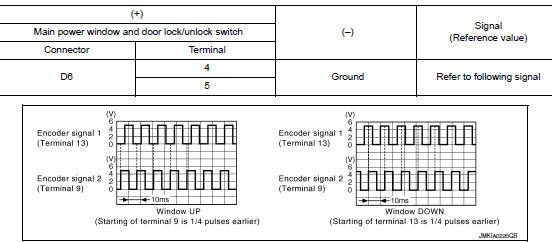
Is the inspection result normal? YES >> GO TO 7.
NO >> GO TO 2.
2.CHECK ENCORDER SIGNAL CIRCUIT
- Turn ignition switch OFF.
- Disconnect main power window and door lock/unlock switch connector and front power window motor LH connector.
- Check continuity between main power window and door lock/unlock switch harness connector and front power window motor LH harness connector.

- Check continuity between main power window and door lock/unlock switch harness connector and ground.

Is the inspection result normal? YES >> GO TO 3.
NO >> Repair or replace harness.
3.CHECK ENCORDER POWER SUPPLY CIRCUIT
- Connect main power window and door lock/unlock switch connector.
- Turn ignition switch ON.
- Check voltage between front power window motor LH harness connector and ground.

Is the inspection result normal? YES >> GO TO 4.
NO >> GO TO 5.
4.CHECK GROUND CIRCUIT
- Turn ignition switch OFF.
- Check continuity between front power window motor LH harness connector and ground.

Is the inspection result normal? YES >> GO TO 7.
NO >> GO TO 6.
5.CHECK HARNESS CONTINUITY 1
- Turn ignition switch OFF.
- Check continuity between main power window and door lock/unlock switch harness connector and front power window motor LH harness connector.

- Check continuity between main power window and door lock/unlock switch harness connector and ground.

Is the inspection result normal? YES >> Replace main power window and door lock/unlock switch. Refer to PWC-65, "Removal and Installation".
NO >> Repair or replace harness.
6.CHECK HARNESS CONTINUITY 2
- Disconnect main power window and door lock/unlock switch connector.
- Check continuity between main power window and door lock/unlock switch harness connector and front power window motor LH harness connector.

Is the inspection result normal? YES >> Replace main power window and door lock/unlock switch. Refer to PWC-65, "Removal and Installation".
NO >> Repair or replace harness.
7.CHECK INTERMITTENT INCIDENT
Refer to GI-41, "Intermittent Incident".
>> Inspection End.
 Power window motor
DRIVER SIDE
DRIVER SIDE : Description
Door glass moves UP/DOWN by receiving the signal from main power window and
door lock/unlock switch.
DRIVER SIDE : Component Function Check
1. CHECK FRONT P ...
 Power window relay
Description
Power is supplied to the main power window and door lock/unlock with BCM
control.
Component Function Check
1. CHECK POWER WINDOW RELAY POWER SUPPLY CIRCUIT
Check that an operation no ...
Other materials:
Seats
WARNING
Do not ride in a moving vehicle when
the seatback is reclined. This can be
dangerous. The shoulder belt will not
be against your body. In an accident,
you could be thrown into it and receive
neck or other serious injuries. You
could also slide under ...
Component parts
MOONROOF
MOONROOF : Component Parts Location
Moonroof switch
View with headliner removed
Combination meter
Behind instrument panel (LH)
View with LH door open (RH similiar)
MOONROOF : Component Description
No
Component
Function
1
Moonroof swi ...
Basic inspection
DIAGNOSIS AND REPAIR WORKFLOW
Work Flow
OVERALL SEQUENCE
DETAILED FLOW
1.GET INFORMATION FOR SYMPTOM
Get detailed information from the customer about the symptom (the condition
and the environment when the
incident/malfunction occurred).
>> GO TO 2.
2.CONFIRM THE SYMPTOM
Try t ...
