
Nissan Rogue Owners Manual: Doors
When the doors are locked using one of the following methods, the doors cannot be opened using the inside or outside door handles. The doors must be unlocked to open the doors.
WARNING
|
Locking with key
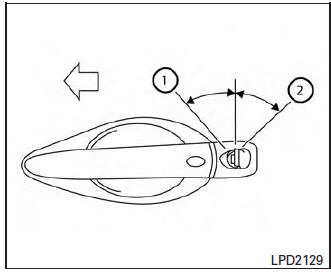
Driver’s side
Manual
To lock a door, turn the key toward the front of the vehicle 1 . To unlock, turn the key toward the rear 2 .

Driver’s side
Power
The power door lock system allows you to lock or unlock all doors at the same time.
Turning the key toward the front 1 of the vehicle locks all doors.
Turning the key one time toward the rear 2 of the vehicle unlocks that door. From that position, returning the key to neutral 3 (where the key can only be removed and inserted) and turning it toward the rear again 4 within 5 seconds unlocks all doors.
Opening and closing windows
The driver’s door key operation allows you to open and close windows equipped with automatic operation at the same time.
- To open the windows, turn the driver’s door key toward the rear of the vehicle for longer than 1 second after the door is unlocked.
- To close the windows, turn the driver’s door
key toward the front of the vehicle for longer
than 1 second after the door is locked.
Windows stop when the key cylinder is released.
NOTE: When the window lock button is pressed the key will not operate the window open or close function.
Locking with inside lock knob
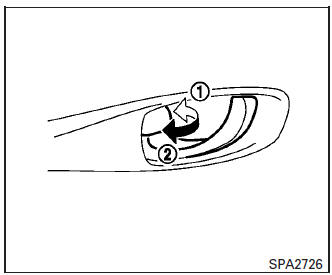
Inside lock
To lock the door without the key, move the inside lock knob to the lock position 1 , then close the door.
To unlock the door without the key, move the inside lock knob to the unlock position 2 .
Locking with power door lock switch
To lock all the doors without a key, push the door lock switch (driver’s or front passenger’s side) to the lock position 1 . When locking the door this way, be certain not to leave the key inside the vehicle.
To unlock all the doors without a key, push the door lock switch (driver’s or front passenger’s side) to the unlock position 2 .
Lockout protection
When the power door lock switch is moved to the lock position and any door is open, all doors will lock and unlock automatically. With the Intelligent Key left in the vehicle and any door open, all doors will unlock automatically and a chime will sound after the door is closed.
These functions help to prevent the Intelligent Key from being accidentally locked inside the vehicle.
Automatic door locks
- All doors lock automatically when the vehicle speed reaches 15 MPH (24 km/h).
- All doors unlock automatically when the ignition switch is placed in the OFF position (models with Intelligent Key system) or when the key is removed from the ignition switch (models without Intelligent Key system).
The automatic unlock function can be deactivated or activated. To deactivate or activate the automatic door unlock system, perform the following procedure:
- Close all doors.
- Place the ignition switch in the ON position.
- Within 20 seconds of performing Step 2,
push and hold the power door lock switch to
the
 position (UNLOCK) for more
than
five seconds.
position (UNLOCK) for more
than
five seconds. - When activated, the hazard indicator will flash twice. When deactivated, the hazard indicator will flash once.
- The ignition switch must be placed in the OFF and ON position again between each setting change.
When the automatic door unlock system is deactivated, the doors do not unlock when the ignition switch is placed in the OFF position (models with Intelligent Key system) or when the key is removed from the ignition switch (models without Intelligent Key system). To unlock the door manually, use the inside lock knob or the power door lock switch (driver’s or front passenger’s side).
NOTE: The automatic door unlock function can be changed using the Vehicle Settings in the vehicle information display. The “Selective Unlock� choices are:
- ON
- OFF
Child safety rear door lock
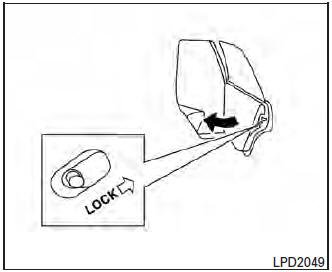
Child safety rear door lock
Child safety locks help prevent the rear doors from being opened accidentally, especially when small children are in the vehicle.
The child safety lock levers are located on the edge of the rear doors.
When the lever is in the LOCK position, the door can be opened only from the outside.
 NISSAN Vehicle Immobilizer System keys
You can only drive your vehicle using the master
keys which are registered to the NISSAN Vehicle
Immobilizer System components in your vehicle.
These keys have a transponder chip in the key
head ...
 Remote keyless entry system (if so equipped)
WARNING
Radio waves could adversely affect
electric medical equipment. Those who
use a pacemaker should contact the
electric medical equipment manufacturer
for the pos ...
Other materials:
P0460 fuel level sensor
DTC Description
DTC DETECTION LOGIC
When the vehicle is parked, naturally the fuel level in the fuel tank is
stable. It means that output signal of the
fuel level sensor does not change. If ECM senses sloshing signal from the
sensor, fuel level sensor malfunction
is detected.
DTC No. ...
Washer tank
Exploded View
Cap
Washer tank
Washer tank inlet
Clip
Removal and Installation
REMOVAL
Drain washer fluid.
Using a suitable tool release washer tank inlet clip and remove
washer tank inlet.
Remove engine side cover. Refer EXT-28, "FEND ...
B1428 seat belt buckle switch IH
Description
DTC B1428 SEAT BELT BUCKLE SWITCH LH
The air bag diagnosis sensor unit monitors the seat belt buckle switch LH
status. If the control unit detects an
open or short condition in the circuit, it will set the DTC.
PART LOCATION
Refer to SRC-6, "Component Parts Location".
D ...
