
Nissan Rogue Owners Manual: Remote keyless entry system (if so equipped)
WARNING
|
It is possible to lock/unlock all doors, turn the interior lights on, and activate the panic alarm by using the keyfob from outside the vehicle.
Be sure to remove the key from the vehicle before locking the doors. The keyfob can operate at a distance of approximately 33 ft (10 m) from the vehicle. The effective distance depends on the conditions around the vehicle.
As many as four keyfobs can be used with one vehicle. For information concerning the purchase and use of additional keyfobs, contact a NISSAN dealer.
The keyfob will not function when:
- the battery is discharged
- the distance between the vehicle and the keyfob is over 33 ft (10 m)
The panic alarm will not activate when the key is in the ignition switch.
| CAUTION Listed below are conditions or occurrences which will damage the keyfob:
If a keyfob is lost or stolen, NISSAN recommends erasing the ID code of that keyfob. This will prevent the keyfob from unauthorized use to unlock the vehicle. For information regarding the erasing procedure, please contact a NISSAN dealer. |
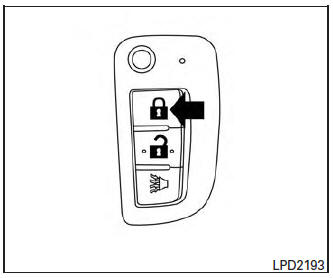
How to use remote keyless entry system
Locking doors
- Remove the ignition key.
- Close all the doors.
- Push the LOCK
 button
on the keyfob.
button
on the keyfob.
- All the doors will lock.
- The hazard indicator flashes twice and the horn beeps once .
NOTE: An auto-relock function will operate after a full or partial unlock, when no further user action occurs. The relock will operate approximately one minute after full or partial unlock. The auto-relock function is cancelled when any door is opened or the key is inserted into the ignition.
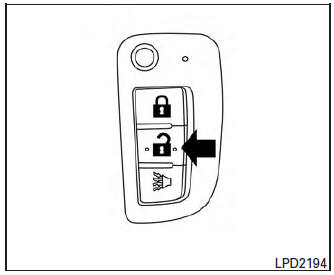
Unlocking doors
- Press the UNLOCK
 button on the
keyfob to unlock the driver’s door.
button on the
keyfob to unlock the driver’s door. - The hazard warning lights flash once.
- Press the UNLOCK
 button again
within five seconds to unlock all doors.
button again
within five seconds to unlock all doors.
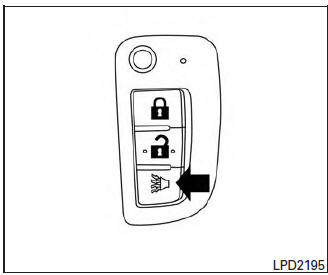
Using the panic alarm
If you are near your vehicle and feel threatened,
you may activate the panic alarm to call attention
by pressing and holding the  button
on the
keyfob for longer than 0.5 seconds.
button
on the
keyfob for longer than 0.5 seconds.
The panic alarm will stay on for a period of time.
The panic alarm stops when:
- it has run for a period of time, or
- any button is pressed on the keyfob.
Using the interior light
Press the button on the keyfob
once to
turn on the interior lights.
For additional information, refer to “Interior light� in the “Instruments and controls� section in this manual.
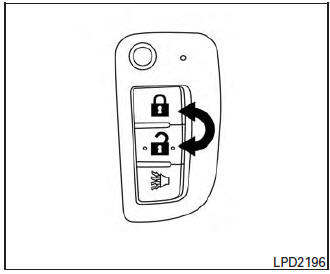
Answer back horn feature
If desired, the answer back horn feature can be
deactivated using the keyfob. When deactivated
and the LOCK  button is pushed the
hazard indicator flashes twice and when the
UNLOCK
button is pushed the
hazard indicator flashes twice and when the
UNLOCK  button is pushed, neither
the
hazard indicator nor the horn operates.
button is pushed, neither
the
hazard indicator nor the horn operates.
NOTE: If you change the answer back horn and light flash feature with the keyfob, the vehicle information display screen will show the current mode after the ignition switch has been cycled from the OFF to the ON position. The vehicle information display screen can also be used to change the answer back horn mode. For additional information, refer to “Answer back horn� in the “Instruments and controls� section of this manual.
To deactivate: Press and hold the
and buttons for at least two
seconds.
The hazard warning lights will flash three times to confirm that the answer back horn feature has been deactivated.
To activate: Press and hold the
and buttons for at least two seconds
once more.
The hazard warning lights will flash once and the horn will sound once to confirm that the horn beep feature has been reactivated.
Deactivating the horn beep feature does not silence the horn if the alarm is triggered.
 Doors
Doors
When the doors are locked using one of the
following methods, the doors cannot be opened
using the inside or outside door handles. The
doors must be unlocked to open the doors.
WARNING
...
 NISSAN Intelligent Key® (if so equipped)
WARNING
Radio waves could adversely affect
electric medical equipment. Those who
use a pacemaker should contact the
electric medical equipment manufacturer
for the pos ...
Other materials:
Child safety
WARNINGDo not allow children to play with the seat
belts. Most seating positions are
equipped with Automatic Locking Retractor
(ALR) mode seat belts. If the seat belt
becomes wrapped around a child’s neck
with the ALR mode activated, the child can
be seriously injured or k ...
P060B ECM
DTC Description
DTC DETECTION LOGIC
DTC No.
CONSULT screen terms
(Trouble diagnosis content)
DTC detecting condition
P060B
CONTROL MODULE
(Internal control module A/D processing
performance)
ECM internal analog/digital conversion processing system is
malfun ...
Operation
AUTOMATIC SPEED CONTROL DEVICE (ASCD)
AUTOMATIC SPEED CONTROL DEVICE (ASCD) : Switch Name and Function
SWITCHES AND INDICATORS
A On the combination meter
B On the steering wheel
1 CRUISE indicator
2 SET indicator
3 CANCEL switch
4 ACCEL/RES switch
5 COAST/SET switch
6 ASCD MAIN sw ...
