
Nissan Rogue Service Manual: Diagnosis system (BCM) (without intelligent key system)
COMMON ITEM
COMMON ITEM : CONSULT Function (BCM - COMMON ITEM)
APPLICATION ITEM
CONSULT performs the following functions via CAN communication with BCM.
|
Direct Diagnostic Mode |
Description |
| Ecu Identification | The BCM part number is displayed. |
| Self Diagnostic Result | The BCM self diagnostic results are displayed. |
| Data Monitor | The BCM input/output data is displayed in real time. |
| Active Test | The BCM activates outputs to test components. |
| Work support | The settings for BCM functions can be changed. |
| Configuration |
|
| CAN Diag Support Mntr | The result of transmit/receive diagnosis of CAN communication is displayed. |
SYSTEM APPLICATION
BCM can perform the following functions.
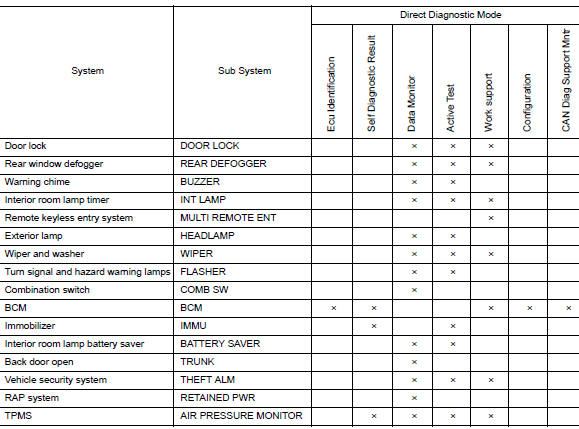
INT LAMP
INT LAMP : CONSULT Function (BCM - INT LAMP)
DATA MONITOR
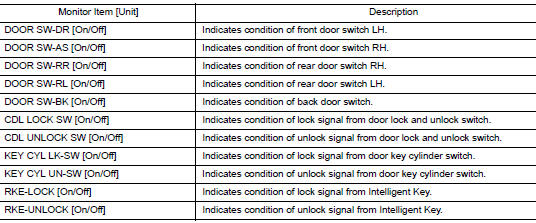
ACTIVE TEST

WORK SUPPORT

*: Initial setting
BATTERY SAVER
BATTERY SAVER : CONSULT Function (BCM - BATTERY SAVER)
DATA MONITOR
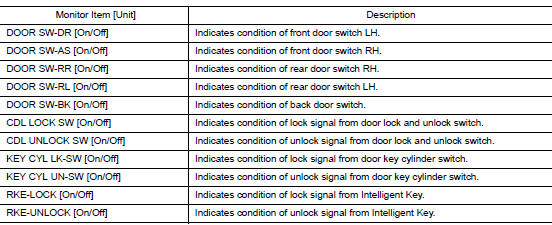
ACTIVE TEST

 Diagnosis system (BCM) (with intelligent key system)
COMMON ITEM
COMMON ITEM : CONSULT Function (BCM - COMMON ITEM)
APPLICATION ITEM
CONSULT performs the following functions via CAN communication with BCM.
Direct Diagnostic Mode
De ...
 ECU diagnosis information
BCM
List of ECU Reference
...
Other materials:
Steering angle sensor
Exploded View
Combination switch
Steering angle sensor
Spiral cable
Removal and Installation
Removal and Installation
Remove the spiral cable. Refer to SR-15, "Exploded View".
Remove screws (A) and then remove steering angle sensor (1).
INSTALLATI ...
Towing load/specification
TOWING LOAD/SPECIFICATION CHART
U.S. and Canada
Maximum Towing Capacity*1
1,100lb.
(500 kg)
Maximum Tongue Load
110 lb.
(50 kg)
Maximum Gross Combined Weight Rating
5,291 lb.
(2,400 kg)
*1: The towing capacity ...
Wheel and tire
Adjustment
BALANCING WHEELS (ADHESIVE WEIGHT TYPE)
Preparation Before Adjustment
Remove inner and outer balance weights from the wheel. Using releasing agent,
remove double-faced adhesive
tape from the wheel and tire.
CAUTION:
Be careful not to scratch the wheel and tire during remo ...
