
Nissan Rogue Service Manual: Diagnosis system (BCM)
WITH INTELLIGENT KEY
WITH INTELLIGENT KEY : CONSULT Function (BCM - COMMON ITEM)
APPLICATION ITEM
CONSULT performs the following functions via CAN communication with BCM.
| Direct Diagnostic Mode | Description |
| Ecu Identification | The BCM part number is displayed. |
| Self Diagnostic Result | The BCM self diagnostic results are displayed. |
| Data Monitor | The BCM input/output data is displayed in real time. |
| Active Test | The BCM activates outputs to test components |
| Work support | The settings for BCM functions can be changed. |
| Configuration |
|
| CAN Diag Support Mntr | The result of transmit/receive diagnosis of CAN communication is displayed. |
SYSTEM APPLICATION
BCM can perform the following functions.
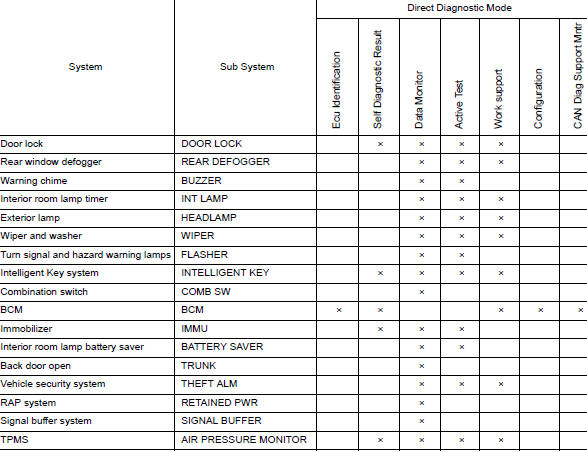
WITH INTELLIGENT KEY : CONSULT Function (BCM-AIR PRESSURE MONITOR)
NOTE: The Signal Tech II Tool (J-50190) can be used to perform the following functions. Refer to the Signal Tech II User Guide for additional information.
- Activate and display TPMS sensor IDs
- Display tire pressure reported by the TPMS sensor
- Read TPMS DTCs
- Register TPMS sensor IDs
- Check Intelligent Key relative signal strength
- Confirm vehicle Intelligent Key antenna signal strength
SELF DIAGNOSTIC RESULT
NOTE: Before performing Self Diagnostic Result, be sure to register the sensor ID or the actual malfunction may be different from that displayed on CONSULT.
Refer to BCS-48, "DTC Index".
DATA MONITOR
|
Monitor Item [Unit] |
Description |
| AIR PRESS FL [kPa, kg/cm2 or Psi] | Indicates air pressure of front LH tire. |
| AIR PRESS FR [kPa, kg/cm2 or Psi] | Indicates air pressure of front RH tire. |
| AIR PRESS RR [kPa, kg/cm2 or Psi] | Indicates air pressure of rear RH tire. |
| AIR PRESS RL [kPa, kg/cm2 or Psi] | Indicates air pressure of rear LH tire. |
| ID REGST FL1 [Done/Yet] | Indicates ID registration status of front LH sensor. |
| ID REGST FR1 [Done/Yet] | Indicates ID registration status of front RH sensor. |
| ID REGST RR1 [Done/Yet] | Indicates ID registration status of rear RH sensor. |
| ID REGST RL1 [Done/Yet] | Indicates ID registration status of rear LH sensor. |
| WARNING LAMP [Off/On] | Indicates condition of low tire pressure warning lamp in combination meter. |
| BUZZER [Off/On] | Indicates condition of buzzer in combination meter. |
ACTIVE TEST
|
Test Item |
Description |
| FLASHER | This test is able to check turn signal lamp operation [Off/LH/RH]. |
| HORN | This test is able to check horn operation [On]. |
| WARNING LAMP | This test is able to check tire pressure warning lamp operation [On/Off]. |
| ID REGIST WARNING | This test is able to check ID regist warning chime operation [On/Off]. |
WORK SUPPORT
|
Support Item |
Description |
| ID READ | The registered ID number is displayed. |
| ID REGIST | Refer to WT-21, "Description". |
WITHOUT INTELLIGENT KEY
WITHOUT INTELLIGENT KEY : CONSULT Function (BCM - COMMON ITEM)
APPLICATION ITEM
CONSULT performs the following functions via CAN communication with BCM.
| Direct Diagnostic Mode | Description |
| Ecu Identification | The BCM part number is displayed. |
| Self Diagnostic Result | The BCM self diagnostic results are displayed. |
| Data Monitor | The BCM input/output data is displayed in real time. |
| Active Test | The BCM activates outputs to test components. |
| Work support | The settings for BCM functions can be changed. |
| Configuration |
|
| CAN Diag Support Mntr | The result of transmit/receive diagnosis of CAN communication is displayed. |
SYSTEM APPLICATION
BCM can perform the following functions.
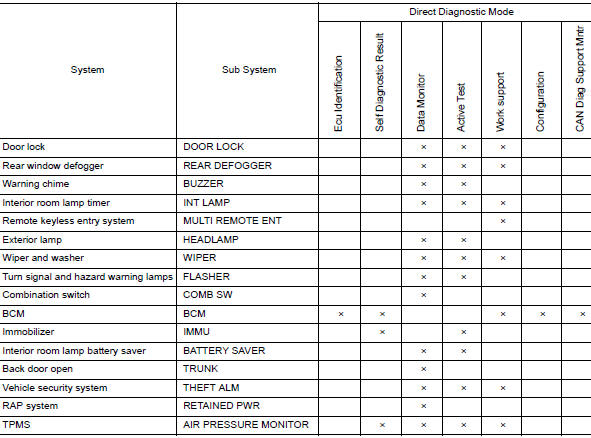
WITHOUT INTELLIGENT KEY : CONSULT Function (BCM-AIR PRESSURE MONITOR)
NOTE: The Signal Tech II Tool (J-50190) can be used to perform the following functions. Refer to the Signal Tech II User Guide for additional information.
- Activate and display TPMS sensor IDs
- Display tire pressure reported by the TPMS sensor
- Read TPMS DTCs
- Register TPMS sensor IDs
SELF DIAGNOSTIC RESULT
NOTE: Before performing Self Diagnostic Result, be sure to register the sensor ID or the actual malfunction may be different from that displayed on CONSULT.
Refer to BCS-108, "DTC Index".
DATA MONITOR
|
Monitor Item [Unit] |
Description |
| AIR PRESS FL [kPa, kg/cm2 or Psi] | Indicates air pressure of front LH tire. |
| AIR PRESS FR [kPa, kg/cm2 or Psi] | Indicates air pressure of front RH tire. |
| AIR PRESS RR [kPa, kg/cm2 or Psi] | Indicates air pressure of rear RH tire. |
| AIR PRESS RL [kPa, kg/cm2 or Psi] | Indicates air pressure of rear LH tire. |
| ID REGST FL1 [Done/Yet] | Indicates ID registration status of front LH sensor. |
| ID REGST FR1 [Done/Yet] | Indicates ID registration status of front RH sensor. |
| ID REGST RR1 [Done/Yet] | Indicates ID registration status of rear RH sensor |
| ID REGST RL1 [Done/Yet] | Indicates ID registration status of rear LH sensor. |
| WARNING LAMP [Off/On] | Indicates condition of low tire pressure warning lamp in combination meter. |
| BUZZER [Off/On] | Indicates condition of buzzer in combination meter. |
ACTIVE TEST
|
Test Item |
Description |
| FLASHER | This test is able to check turn signal lamp operation [Off/LH/RH]. |
| HORN | This test is able to check horn operation [On]. |
| WARNING LAMP | This test is able to check tire pressure warning lamp operation [On/Off]. |
| ID REGIST WARNING | This test is able to check ID regist warning chime operation [On/Off]. |
WORK SUPPORT
|
Support Item |
Description |
| ID READ | The registered ID number is displayed. |
| ID REGIST | Refer to WT-21, "Description". |
 System
System Description
When the vehicle has reached a speed of 40 km/h (25 MPH) or greater, the BCM
receives a signal transmitted
from the tire pressure sensors installed in each wheel. If the BCM det ...
 ECU diagnosis information
BCM
List of ECU Reference
...
Other materials:
Rear disc brake
Brake Burnishing
CAUTION:
Burnish contact surfaces between brake pads and disc brake
rotor according to the following procedure
after refinishing the disc brake rotor, replacing brake pads or if a soft
pedal occurs at very low
mileage.
Be careful of vehicle speed. Brakes ...
Precaution
Precaution for Supplemental Restraint System (SRS) "AIR BAG" and "SEAT
BELT
PRE-TENSIONER"
The Supplemental Restraint System such as “AIR BAG� and “SEAT BELT PRE-TENSIONER�,
used along
with a front seat belt, helps to reduce the risk or severity of injury to the
...
Removal and installation
BCM (BODY CONTROL MODULE)
Removal and Installation
CAUTION:
Before replacing the BCM, perform “READ CONFIGURATION� to save or print current
vehicle specification.
Refer to BCS-120, "ADDITIONAL SERVICE WHEN REPLACING CONTROL UNIT (BCM) : Work
Procedure".
REMOVAL
Disc ...
