
Nissan Rogue Service Manual: Washer switch
Description
- Washer switch is integrated with the combination switch.
- Combination switch (wiper and washer switch) switches polarity between front washer operating and rear washer operating to supply power and ground to the front and rear washer motor.
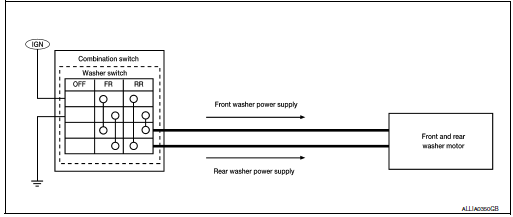
Component Inspection
1. CHECK FRONT WASHER SWITCH
- Turn the ignition switch OFF.
- Disconnect combination switch (wiper and washer switch).
- Check continuity between the combination switch (wiper and washer switch) terminals.

Is the inspection result normal? YES >> GO TO 2.
NO >> Replace combination switch (wiper and washer switch). Refer to BCS-76, "Removal and Installation" (with Intelligent Key system) or BCS-136, "Removal and Installation" (without Intelligent Key system).
2. CHECK REAR WASHER SWITCH
- Check continuity between the combination switch (wiper and washer switch) terminals.

Is the inspection result normal? YES >> Wiper and washer switch is normal.
NO >> Replace combination switch (wiper and washer switch). Refer to BCS-76, "Removal and Installation" (with Intelligent Key system) or BCS-136, "Removal and Installation" (without Intelligent Key system).
 Washer motor circuit
Diagnosis Procedure
Regarding Wiring Diagram information, refer to WW-22, "Wiring Diagram".
1. CHECK FRONT AND REAR WASHER MOTOR FUSE
Turn the ignition switch OFF.
Check ...
 Rear wiper motor circuit
Component Function Check
1. CHECK REAR WIPER ON OPERATION
CONSULT ACTIVE TEST
Select "RR WIPER" of BCM active test item.
While operating the test item, check rear wiper ...
Other materials:
Removal and installation
ACCELERATOR PEDAL ASSEMBLY
Exploded View
Brake pedal
Accelerator pedal assembly
Locator hook
Locator pin
Bolt
Removal and Installation
REMOVAL
Disconnect the harness connector from the accelerator pedal
assembly.
Remove the bolts, then rem ...
Front disc brake
BRAKE PAD (1 PISTON TYPE)
BRAKE PAD (1 PISTON TYPE) : Exploded View
Torque member
Bushing
Piston boot
Slide pin boot
Slide pin
Piston
Piston seal
Brake caliper body
Bleeder cap
Brake hose
Copper sealing washers
Inner shim cover
Inner s ...
P0335 CKP sensor (POS)
DTC Description
DTC DETECTION LOGIC
DTC No.
CONSULT screen terms
(Trouble diagnosis content)
DTC detecting conditio
P0335
CKP SEN/CIRCUIT
(Crankshaft position sensor ″A″ circuit)
The crankshaft position sensor (POS) signal is not detected by
...
