
Nissan Rogue Service Manual: Diagnosis and repair workflow
Work Flow
OVERALL SEQUENCE
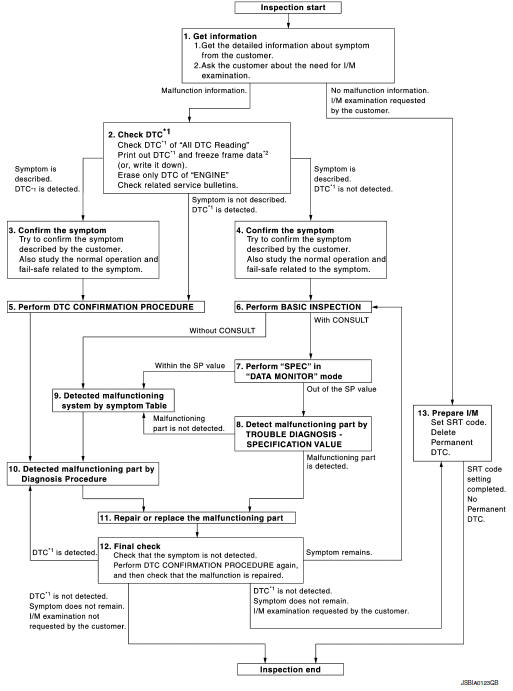
DETAILED FLOW
1.GET INFORMATION FOR SYMPTOM
- Get the detailed information from the customer about the symptom (the condition and the environment when the incident/malfunction occurred) using the “Diagnostic Work Sheet�. (Refer to EC-130, "Diagnostic Work Sheet".)
- Ask if the customer requests I/M examination.
Malfunction information, obtained>>GO TO 2.
No malfunction information, but a request for I/M examination>>GO TO 13.
2.CHECK DTC
- Check DTC.
- Perform the following procedure if DTC is displayed.
- Record DTC and freeze frame data. (Print them out with CONSULT or GST.)
- Erase only DTC of “ENGINE�.
- Study the relationship between the cause detected by DTC and the
symptom described by the customer.
(Symptom Matrix Chart is useful. Refer to EC-486, "Symptom Table".)
- Check related service bulletins for information.
Are any symptoms described and any DTCs detected? Symptom is described, DTC is detected>>GO TO 3.
Symptom is described, DTC is not detected>>GO TO 4.
Symptom is not described, DTC is detected>>GO TO 5.
3.CONFIRM THE SYMPTOM
Try to confirm the symptom described by the customer (except MIL ON).
Also study the normal operation and fail-safe related to the symptom. Refer to EC-492, "Description" and EC- 89, "Fail Safe".
Diagnosis Work Sheet is useful to verify the incident.
Verify relation between the symptom and the condition when the symptom is detected.
>> GO TO 5.
4.CONFIRM THE SYMPTOM
Try to confirm the symptom described by the customer.
Also study the normal operation and fail-safe related to the symptom. Refer to Refer to EC-492, "Description" and EC-89, "Fail Safe".
Diagnosis Work Sheet is useful to verify the incident.
Verify relation between the symptom and the condition when the symptom is detected.
>> GO TO 6.
5.PERFORM DTC CONFIRMATION PROCEDURE
Perform DTC CONFIRMATION PROCEDURE for the displayed DTC, and then check that DTC is detected again.
If two or more DTCs are detected, refer to EC-92, "DTC Inspection Priority Chart" and determine trouble diagnosis order.
NOTE:
- Freeze frame data is useful if the DTC is not detected.
- Perform Component Function Check if DTC CONFIRMATION PROCEDURE
is not included on Service
Manual. This simplified check procedure is an effective alternative though
DTC cannot be detected during
this check.
If the result of Component Function Check is NG, it is the same as the detection of DTC by DTC CONFIRMATION PROCEDURE.
Is DTC detected? YES >> GO TO 10.
NO >> Check according to GI-41, "Intermittent Incident".
6.PERFORM BASIC INSPECTION
Perform EC-132, "Work Procedure".
Do you have CONSULT? YES >> GO TO 7.
NO >> GO TO 9.
7.PERFORM SPEC IN DATA MONITOR MODE
 With CONSULT
Check that “MASS AIR FLOW SENSOR (Hz)�, “B/FUEL SCHDL�, and “A/F ALPHA-B1� are within the SP value using “SPEC� in “DATA MONITOR� mode with CONSULT. Refer to EC-157, "Component Function Check".
Is the measurement value within the SP value? YES >> GO TO 9.
NO >> GO TO 8.
8.DETECT MALFUNCTIONING PART BY TROUBLE DIAGNOSIS - SPECIFICATION VALUE
Detect malfunctioning part according to EC-158, "Diagnosis Procedure".
Is a malfunctioning part detected? YES >> GO TO 11.
NO >> GO TO 9.
9.DETECT MALFUNCTIONING SYSTEM BY SYMPTOM TABLE
Detect malfunctioning system according to EC-486, "Symptom Table" based on the confirmed symptom in step 4, and determine the trouble diagnosis order based on possible causes and symptoms.
>> GO TO 10.
10.DETECT MALFUNCTIONING PART BY DIAGNOSIS PROCEDURE
Inspect according to Diagnosis Procedure of the system.
NOTE: The Diagnosis Procedure in EC section described based on open circuit inspection. A short circuit inspection is also required for the circuit check in the Diagnosis Procedure. For details, refer to GI-44, "Circuit Inspection". Is a malfunctioning part detected? YES >> GO TO 11.
NO >> Monitor input data from related sensors or check voltage of related ECM terminals using CONSULT.
Refer to EC-77, "Reference Value".
11.REPAIR OR REPLACE THE MALFUNCTIONING PART
- Repair or replace the malfunctioning part.
- Reconnect parts or connectors disconnected during Diagnosis Procedure again after repair and replacement.
- Check DTC. If DTC is displayed, erase it.
>> GO TO 12.
12.FINAL CHECK
When DTC was detected in step 2, perform DTC CONFIRMATION PROCEDURE or Component Function Check again, and then check that the malfunction have been completely repaired.
When symptom was described from the customer, refer to confirmed symptom in step 3 or 4, and check that the symptom is not detected.
Is DTC detected and does symptom remain? YES-1 >> DTC is detected: GO TO 10.
YES-2 >> Symptom remains: GO TO 6.
NO-1 >> No request for I/M examination from the customer: Before returning the vehicle to the customer, always erase unnecessary DTC in ECM. If the completion of SRT is needed, drive vehicle under the specific driving pattern. Refer to EC-146, "SRT Set Driving Pattern".
NO-2 >> I/M examination, requested from the customer: GO TO 13.
13.PREPARE FOR I/M EXAMINATION
- Set SRT codes. Refer to EC-145, "Description".
- Erase permanent DTCs. Refer to EC-151, "Description".
>> INSPECTION END
Diagnostic Work Sheet
DESCRIPTION
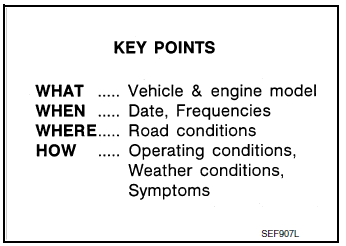
There are many operating conditions that lead to the malfunction of engine components. A good grasp of such conditions can make troubleshooting faster and more accurate.
In general, each customer feels differently about symptoms. It is important to fully understand the symptoms or conditions for a customer complaint.
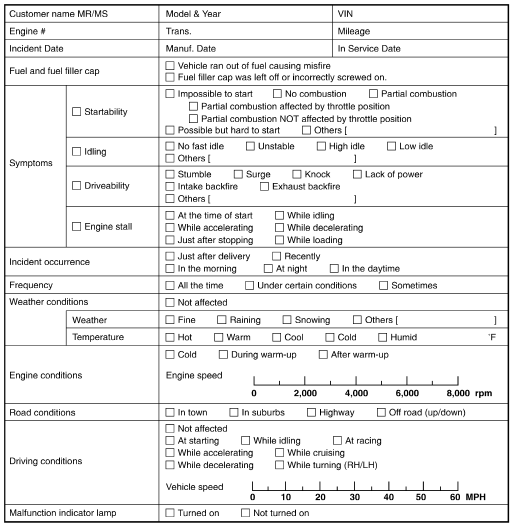
Utilize a diagnostic worksheet like the WORKSHEET SAMPLE below in order to organize all the information for troubleshooting.
Some conditions may cause the MIL to illuminate or blink, and DTC to be detected. Examples:
- Vehicle ran out of fuel, which caused the engine to misfire.
- Fuel filler cap was left off or incorrectly screwed on, allowing fuel to evaporate into the atmosphere.
WORKSHEET SAMPLE
 Basic inspection
...
 Basic inspection
Work Procedure
1.INSPECTION START
Check service records for any recent repairs that may indicate a
related malfunction, or a current need for
scheduled maintenance.
Open engine ...
Other materials:
Wiring diagram
ENGINE CONTROL SYSTEM
Wiring Diagram
...
Power liftgate main switch
Power liftgate main switch
The power liftgate operation can be turned on or
off by the power liftgate main switch on the
instrument panel.
When the power liftgate main switch is pushed to
the OFF position, the power operation is not
available by the power liftgate switch on the
liftgate ...
DTC/circuit diagnosis
U1000 CAN COMM CIRCUIT
Description
Refer to LAN-8, "System Description".
DTC Logic
DTC DETECTION LOGIC
NOTE:
U1000 can be set if a module harness was disconnected and reconnected, perhaps
during a repair. Confirm
that there are actual CAN diagnostic symptoms and a present DTC by p ...
