
Nissan Rogue Service Manual: Compressor system symptoms
Symptom Table
Follow the next table and perform trouble diagnosis if there is a compressor unit malfunction (internal noise, insufficient cooling).
|
Symptom |
Inspection method |
Check list |
Result |
Action |
| Noise from compressor unit
When A/C is ON.
(rattling or rolling sound) |
Cooker system internal pressure | Check with manifold gauge | Both high- and lowpressure sides are high.*2 | Recharge with proper amount of refrigerant. |
| High/low-pressures hunt.*2 | Replace compressor only. | |||
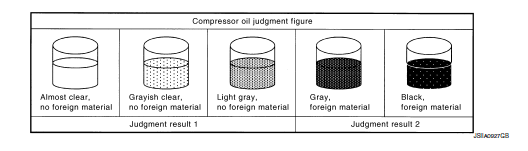
| Check compressor oil condition. | Sample compressor oil and judge. | Refer to the criteria shown in compressor lubricant. | Judgment result 1: Replace
compressor only. Judgment result 2: Replace compressor and liquid tank. |
|
| Insufficient cooling*1 | Compressor body | Check rotation of compressor. If sized or stuck, sample compressor oil and judge. |
||
| Cooler system internal pressure | Check with a manifold gauge. Sample compressor oil and judge if the difference between high-pressure and low-pressure is small or if they are almost the same. |
|||
| Outlet air temperature rises temporarily while driving.*2 |
— |
— |
— |
Replace compressor only. |
*1: First conduct inspection according to trouble diagnosis for each
malfunction.
*2: Applicable to variable capacity compressor only.
 Refrigeration system symptoms
Trouble Diagnosis For Unusual Pressure
Diagnose using a manifold gauge whenever system’s high and/or low side
pressure(s) is/are unusual. The
marker above the gauge scale in the following tables ...

Other materials:
Instrument panel assembly
Exploded View
Defroster grille
Center speaker grille (if equipped)
Side ventilator grille (LH)
Instrument side finisher (LH)
Knee protector
Instrument finisher A
Cluster lid A
Instrument finisher B (without pushbutton
ignition)
Instrument finishe ...
Glove box assembly and housing
Removal and Installation
REMOVAL
Release instrument side finisher (RH) (1) pawls using a suitable
tool and remove.
: Pawl
NOTE:
LH side shown; RH similar.
Release the glove box damper (1) from the glove box assembly
(2) as shown.
Release the glove box assembly pawls ...
Battery
Exploded View
Battery tray liner
Battery frame
Battery
Battery rod
Battery cover
Battery tray
Front
Removal and Installation (Battery)
REMOVAL
Pull back cover of battery positive terminal.
Loosen the battery terminal nuts and disconnect the battery ...
