
Nissan Rogue Owners Manual: CD care and cleaning
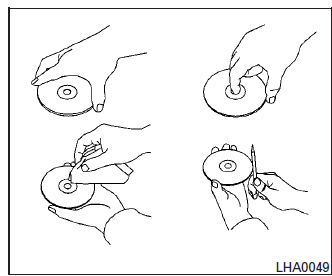
- Handle a CD by its edges. Do not bend the disc. Never touch the surface of the disc.
- Always place the discs in the storage case when they are not being used.
- To clean a disc, wipe the surface from the center to the outer edge using a clean, soft cloth. Do not wipe the disc using a circular motion.
- Do not use a conventional record cleaner or alcohol intended for industrial use.
- A new disc may be rough on the inner and outer edges. Remove the rough edges by rubbing the inner and outer edges with the side of a pen or pencil as illustrated.
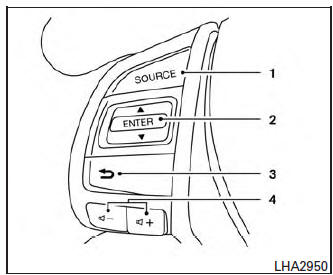
- Source select and power on switch
- Menu control switch/ENTER button
-
 (Back) switch
 - Volume control switc
 Bluetooth® streaming audio with Navigation
System
Bluetooth® streaming audio with Navigation
System
If you have a compatible Bluetooth® audio device
that is capable of playing audio files, the
device can be connected to the vehicle’s audio
system so that the audio files on the device play
thr ...
 Steering wheel switch for audio control
SOURCE select switch
With the ignition switch in the ACC or ON position,
push the SOURCE switch to turn the audio
system on.
Push the source select switch to change the
mode in the following se ...
Other materials:
CAN system (type 7)
MAIN LINE BETWEEN IPDM-E AND DLC CIRCUIT
Diagnosis Procedure
1.CHECK CONNECTOR
Turn the ignition switch OFF.
Disconnect the battery cable from the negative terminal.
Check the following terminals and connectors for damage, bend and
loose connection (connector side
an ...
C1197 vacuum sensor
DTC Logic
DTC DETECTION LOGIC
DTC
Display Item
Malfunction detected condition
Possible causes
C1197
VACUUM SENSOR
When a malfunction is detected in vacuum sensor.
Harness or connector
Vacuum sensor (brake booster)
Vacuum piping
&nb ...
Electrical load signal
Description
The electrical load signal (Headlamp switch signal, rear window defogger
switch signal, etc.) is transferred via
the CAN communication.
Component Function Check
1.CHECK REAR WINDOW DEFOGGER SWITCH FUNCTION
Turn ignition switch ON.
Connect CONSULT and select “DAT ...
