
Nissan Rogue Service Manual: Blower motor
Exploded View
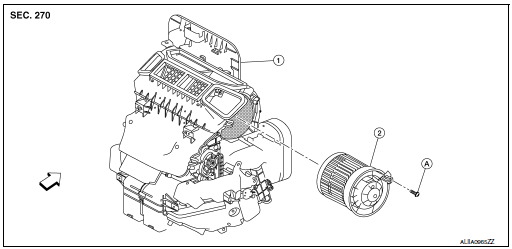
- Heating and cooling unit assembly
- Blower motor
- Screw
 Front
Front
Removal and Installation
REMOVAL
- Remove glove box assembly. Refer to IP-23, "Removal and Installation".
- Disconnect the harness connector from the blower motor.
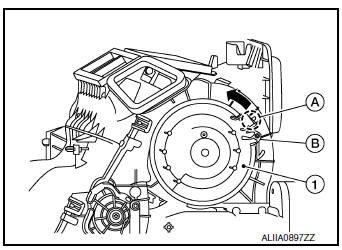
- Remove blower motor screw (B).
- Release hook (A) then rotate the blower motor (1) counterclockwise and remove.
 : Hook
INSTALLATION
Installation is in the reverse order of removal.
 Ducts and grilles
Exploded View
Side defroster duct (RH)
Defroster nozzle
Side defroster duct (LH)
Center ventilator duct
Heating and cooling unit assembly
Front foot duct (LH)
Front ...
 Service data and specifications (SDS)
In-cabin Microfilter
...
Other materials:
Wheel
Inspection
WHEEL
Check tires for wear and improper inflation.
Check wheels for deformation, cracks and other damage. If deformed,
remove wheel and check wheel
runout.
Remove tire from wheel and mount wheel on a balancer machine.
Set dial indicator as shown.
&n ...
Three-way catalyst
The three-way catalyst is an emission control
device installed in the exhaust system. Exhaust
gases in the three-way catalyst are burned at
high temperatures to help reduce pollutants.
WARNING
The exhaust gas and the exhaust system
are very hot. Keep people, animals
or f ...
CVT shift selector
Exploded View
Shift selector knob
Lock pin
Shift selector assembly
Control cable
Shift selector knob cover
Front
Removal and installation
REMOVAL
Apply the parking brake.
CAUTION:
Make sure the vehicle cannot move with the parking brake applied.
Move th ...
