
Nissan Rogue Owners Manual: Windshield-washer fluid
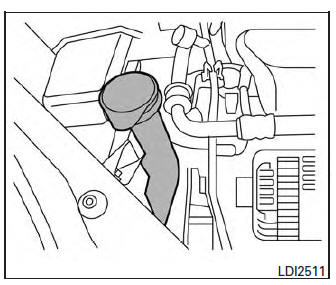
Windshield-washer fluid reservoir
Fill the windshield-washer fluid reservoir periodically.
Add windshield-washer fluid when the low windshield-washer fluid warning light comes on.
To fill the windshield-washer fluid reservoir, lift the cap off the reservoir and pour the windshieldwasher fluid into the reservoir opening.
Add a washer solvent to the washer for better cleaning. In the winter season, add a windshieldwasher antifreeze. Follow the manufacturer’s instructions for the mixture ratio.
Refill the reservoir more frequently when driving conditions require an increased amount of windshield-washer fluid.
Recommended fluid is Genuine NISSAN WindshieldWasher Concentrate Cleaner & Antifreeze or equivalent.
CAUTION
|
 Brake fluid
Brake fluid
Check the brake fluid level in the reservoir. If the
brake warning light comes on, add Genuine
NISSAN Super Heavy Duty Brake Fluid or
equivalent DOT 3 fluid up to the MAX line. If fl ...
 Battery
Keep the battery surface clean and dry.
Clean the battery with a solution of baking
soda and water.
Make certain the terminal connections are
clean and securely tightened.
If ...
Other materials:
P0300, P0301, P0302, P0303, P0304 misfire
DTC Description
DTC DETECTION LOGIC
When a misfire occurs, engine speed will fluctuate. If the engine speed
fluctuates enough to cause the crankshaft
position (CKP) sensor (POS) signal to vary, ECM can determine that a misfire is
occurring.
Sensor
Input signal to ECM
ECM functio ...
On board refueling vapor recovery (ORVR)
Component Function Check
1.CHECK ORVR FUNCTION
Check whether the following symptoms are present.
Fuel odor from EVAP canister is strong.
Cannot refuel/Fuel odor from the fuel filler opening is strong
while refueling.
Are any symptoms present?
YES >> Proceed to EC-477 ...
Compressor system symptoms
Symptom Table
Follow the next table and perform trouble diagnosis if there is a compressor
unit malfunction (internal noise,
insufficient cooling).
Symptom
Inspection method
Check list
Result
Action
Noise from compressor unit
When A/C is ON.
...
