
Nissan Rogue Service Manual: Vehicle information
Identification information
Model Variation
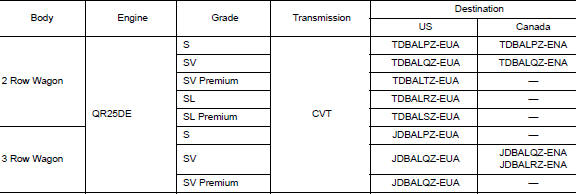
FWD Model
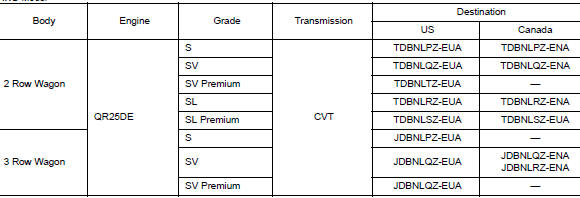
AWD Model
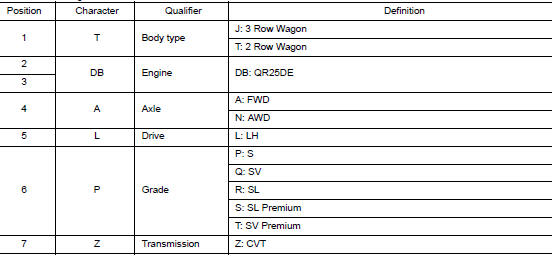
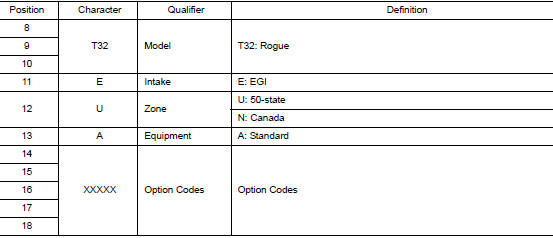
Prefix and Suffix Designations
Identification Number

- Air conditioner specification label
- Emission control information label
- Vehicle identification number chassis number (center of bulkhead)
- Vehicle Identification Number (VIN) plate
- F.M.V.S.S./C.M.V.S.S. certification label
- Tire and loading information label
Vehicle Identification Number Arrangement

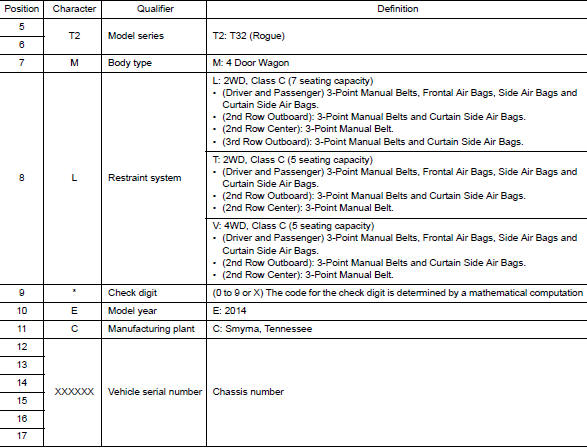
Identification Plate

Engine Serial Number
QR25DE

 Vehicle front
CVT Number

Dimensions
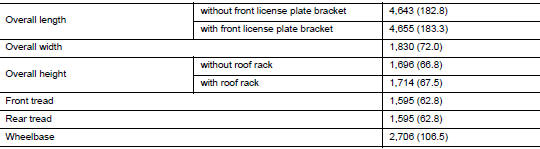
Wheels & Tires

 Vehicle recovery (freeing a stuck vehicle)
FRONT
Securely install the vehicle recovery hook stored with jacking tools.
Check that the hook is properly secured in the stored place after use.
WARNING:
Stand clear of a stuck vehicl ...
 Basic inspection
SERVICE INFORMATION FOR ELECTRICAL INCIDENT
Work flow
STEP
DESCRIPTION
STEP 1
Get detailed information about the conditions and the
environment when the incident occurred ...
Other materials:
How to check terminal
CONNECTOR AND TERMINAL PIN KIT
Use the connector and terminal pin kits listed below when
replacing connectors or terminals.
The connector and terminal pin kits contain some of the most
commonly used NISSAN/INFINITI connectors
and terminals. For detailed connector and termin ...
Preparation
Special Service Tool
The actual shape of the tools may differ from those illustrated here.
Tool number
(TechMate No.)
Tool name
Description
—
(165-GR8-1200KIT-NI)
Multitasking battery and electrical diagnostic
station
Testing batteries, starti ...
Front wiper motor lo circuit
Component Function Check
1.CHECK FRONT WIPER LO OPERATION
CONSULT ACTIVE TEST
Select FR WIPER of BCM (WIPER) active test item.
Check front wiper operation.
LO : Front wiper (LO) operation
OFF : Front wiper OFF
Is the inspection result normal?
YES >> Front wiper motor ...
