
Nissan Rogue Service Manual: Symptom diagnosi
NOISE, VIBRATION, AND HARSHNESS (NVH) TROUBLESHOOTING
NVH troubleshooting - engine noise
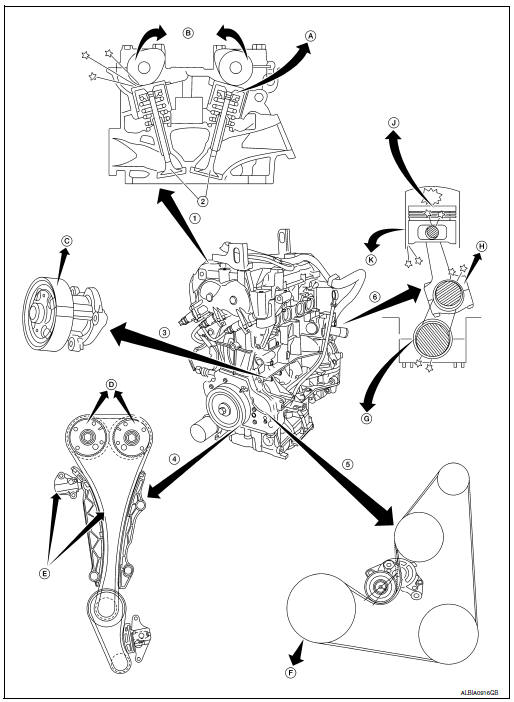
- Valve mechanism
- Intake and exhaust valve
- Water pump
- Timing chain
- Drive belt
- Rotation mechanism
- Tappet noise
- Camshaft bearing noise
- Water pump noise
- VTC noise
- Timing chain and chain tensioner noise
- Drive belt noise (slipping)
- Main bearing noise
- Connecting rod bearing noise
- Piston pin noise
- Piston slap noise
Use the chart below to help you find the cause of the symptom
- Locate the area where noise occurs.
- Confirm the type of noise.
- Specify the operating condition of engine.
- Check specified noise source.
If necessary, repair or replace these parts.
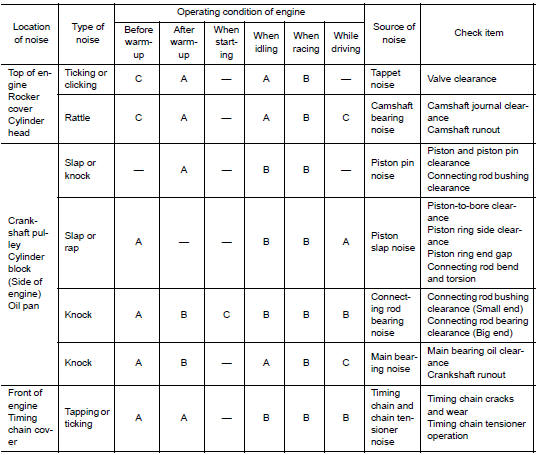
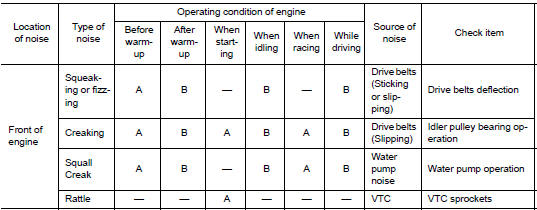
A: Closely related B: Related C: Sometimes related —: Not related
 Liquid Gasket
REMOVAL OF LIQUID GASKET SEALING
After removing the bolts and nuts, separate the mating surface and
remove the liquid gasket using Tool (A).
Tool Number : KV10111100 (J-37228)
CAUTION:
Be c ...
 Preparation
Special service tools
The actual shape of the tools may differ from those illustrated here.
Tool number
(TechMate No.)
Tool name
Description
—
(J-48891)
Spark p ...
Other materials:
Operating range
Operating range
The Intelligent Key functions can only be used
when the Intelligent Key is within the specified
operating range.
When the Intelligent Key battery is almost discharged
or strong radio waves are present near
the operating location, the Intelligent Key system’s
operating ...
Component parts
Component Parts Location
A/C switch assembly
View with front door finisher removed
View with rear door finisher removed
No.
Component parts
Function
1
Front power window switch
Refer to PWC-7, "Power Window Switch".
2
...
C1101, C1102, C1103, C1104 wheel sensor
DTC Logic
DTC DETECTION LOGIC
DTC
Display Item
Malfunction detected condition
Possible causes
C1101
RR RH SENSOR-1
When power supply voltage of rear wheel sensor
RH is low.
When an open or shorted circuit is detected in rear
wheel sensor RH ...
