
Nissan Rogue Service Manual: Room lamp
Removal and Installation
WARNING: Do not touch the glass surface of a bulb while it is lit or right after being turned OFF to prevent burns.
CAUTION:
- Do not touch the glass of bulb directly by hand. Keep grease and other oily substances away from bulb surface.
- Do not leave bulb out of reflector for a long time because moisture, smoke, etc. may affect the performance of lamp.
REMOVAL
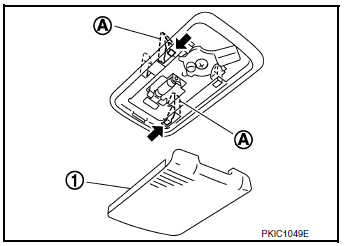
- Lower lens (1) and room lamp as an assembly by releasing room lamp metal clips (A) using a suitable tool.
- Disconnect the harness connector from the room lamp and remove.
INSTALLATION
Installation is in the reverse order of removal.
Bulb Replacement
WARNING: Do not touch the glass surface of a bulb while it is lit or right after being turned OFF to prevent burns.
CAUTION:
- Do not touch the glass of bulb directly by hand. Keep grease and other oily substances away from bulb surface.
- Do not leave bulb out of reflector for a long time because moisture, smoke, etc. may affect the performance of lamp.
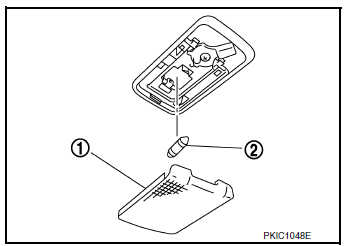
- Remove lens (1) by inserting suitable tool and releasing LH side (switch side) first
- Remove room lamp bulb (2).
- Install room lamp bulb (2).
- Install room lamp lens (1).
NOTE: Insert the lens hook end (RH side) first to install lens.
 Glove box lamp
Bulb Replacement
WARNING:
Do not touch the glass surface of a bulb while it is lit or right after being
turned OFF to prevent burns.
CAUTION:
Do not touch the glass of bulb directly b ...
 Personal lamp
Removal and Installation
The personal lamp is serviced as part of headlining. Refer to INT-30,
"Removal and Installation".
Bulb or Lens Replacement
WARNING:
Do not touch the glass surf ...
Other materials:
Lumbar support switch
Exploded View
Seat cushion outer finisher
Lumbar support switch
Clip
Pawl
Removal and Installation
REMOVAL
Using a suitable tool release clips and remove seat cushion
outer finisher (1).
: Clip
Disconnect harness connector from lumbar support switch.
...
Cold weather driving
Freeing a frozen door lock
To prevent a door lock from freezing, apply deicer
through the key hole. If the lock becomes
frozen, heat the key before inserting it into the key
hole, or use the NISSAN Intelligent Key®.
Antifreeze
In the winter when it is anticipated that the temperature
will dr ...
Washer level switch signal circuit
Description
Transmits the washer fluid level switch signal to the combination meter.
Diagnosis Procedure
Regarding Wiring Diagram information, refer to MWI-32, "Wiring Diagram".
1.CHECK WASHER FLUID LEVEL SWITCH SIGNAL CIRCUIT
Turn ignition switch OFF.
Disconnect comb ...
