
Nissan Rogue Service Manual: Removal and installation
ECM
Removal and Installation
EXPLODED VIEW
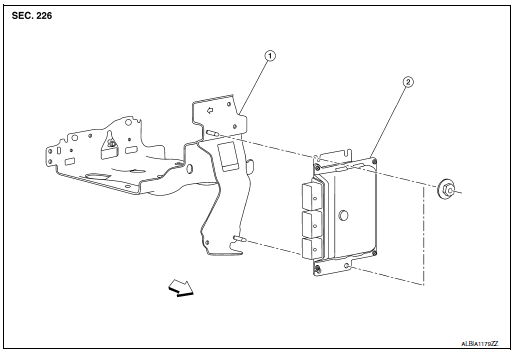
1 ECM bracket
2 ECM
 : Vehicle front
CAUTION: Perform ADDITIONAL SERVICE WHEN REPLACING ECM. Refer to EC-136, "Work Procedure".
REMOVAL
- Disconnect the battery negative terminal.
- Remove the resonator. Refer to EM-24, "Exploded View".
- Disconnect ECM harness connectors.
- Remove ECM mounting nuts, and then remove ECM.
INSTALLATION
Install in the reverse order of removal.
 Periodic maintenance
IDLE SPEED
Inspection
1.CHECK IDLE SPEED
With CONSULT
Check idle speed in “DATA MONITOR� mode of “ENGINE� using CONSULT.
With GST
Check idle speed with Service $01 of GST.
>> IN ...
 Service data and specifications (sds)
Idle Speed
Condition
Specification
No load* (in P or N position)
650 ± 50 rpm
*: Under the following conditions
A/C switch: OFF
Electric load: OFF (Ligh ...
Other materials:
Precaution
Precaution for Supplemental Restraint System (SRS) "AIR BAG" and "SEAT
BELT
PRE-TENSIONER"
The Supplemental Restraint System such as “AIR BAG� and “SEAT BELT PRE-TENSIONER�,
used along
with a front seat belt, helps to reduce the risk or severity of injury to the
...
Precaution
Precaution for Supplemental Restraint System (SRS) "AIR BAG" and "SEAT
BELT
PRE-TENSIONER"
The Supplemental Restraint System such as “AIR BAG� and “SEAT BELT PRE-TENSIONER�,
used along
with a front seat belt, helps to reduce the risk or severity of injury to the
...
U1111 lost communication (chassis control module)
DTC Description
DTC DETECTION LOGIC
DTC
CONSULT screen terms
(Trouble diagnosis content)
DTC detection condition
U1111
LOST COMM (CHASSIS CONT MDUL)
(Lost Communication With Chassis Control
Module)
When the ignition switch is ON, TCM is unable to receive the CA ...
