
Nissan Rogue Service Manual: Rear stabilizer
Exploded View
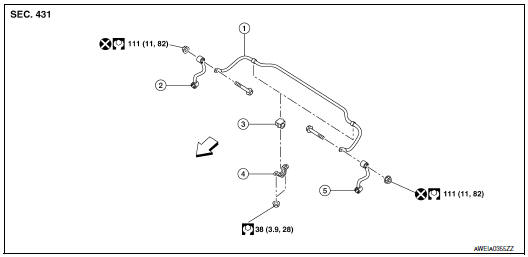
- Rear stabilizer bar
- Connecting rod (RH)
- Rear stabilizer bar bushing
- Rear stabilizer bar clamp
- Connecting rod (LH)
 Front
Front
Removal and Installation
REMOVAL
- Disconnect rear stabilizer links from rear stabilizer bar.
- Remove nuts on rear stabilizer clamp.
- Remove rear stabilizer bar from rear suspension member
- Remove rear stabilizer bushings from rear stabilizer bar (if necessary).
- Perform the inspection after removal. Refer to RSU-21, "Inspection".
INSTALLATION
Installation is in the reverse order of removal.
Inspection
INSPECTION AFTER REMOVAL
Check rear stabilizer bar, rear stabilizer link, rear stabilizer bushing and rear stabilizer clamp for deformation, cracks or damage. Replace it if necessary.
 Upper link
Exploded View
Rear suspension member
Upper link
Rubber washer (LH/RH)
Rear suspension arm
Front
Removal and Installation
REMOVAL
Remove wheel and tir ...
 Unit removal and installationEMBER
REAR SUSPENSION M
Exploded View
Rear suspension member
Suspension member stay
(RH)
Suspension member stay (LH)
Bound bumper
Front
Removal and Installation - F ...
Other materials:
Engine compartment check locations
QR25DE engine
Engine coolant reservoir
Engine oil filler cap
Brake fluid reservoir
Battery
Air cleaner
Fuse/Fusible link box
Radiator cap
Engine oil dipstick
Drive belt location
Windshield-washer fluid reservoir ...
Preparation
Special Service Tools
The actual shapes of TechMate tools may differ from those of special service
tools illustrated here.
Tool number
(TechMate No.)
Tool name
Description
KV38100200
(J-26233)
Drift
a: 65 mm (2.56 in) dia.
b: 49 mm (1.93 in) dia.
...
Location of plastic parts
Precautions for Plastics
CAUTION:
When repairing and painting a portion of the body adjacent to
plastic parts, consider their characteristics (influence of heat
and solvent) and remove them if necessary or take suitable measures to
protect them.
Plastic parts should be ...
