
Nissan Rogue Service Manual: Parking brake control
Exploded View
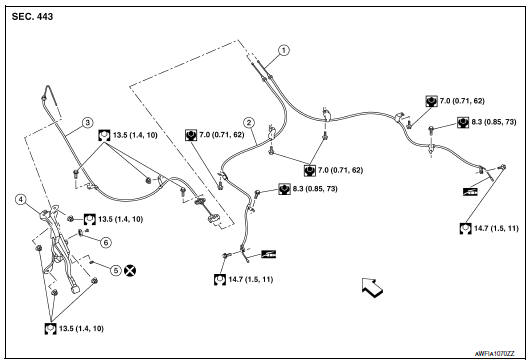
- Parking brake rear cable (RH)
- Parking brake rear cable (LH)
- Parking brake front cable
- Parking brake control
- Adjusting nut
- Parking brake switch
Removal and Installation
REMOVAL
- Remove instrument lower panel LH. Refer to IP-22, "Removal and Installation".
- Remove the knee protector. Refer to IP-14, "Exploded View".
- Disconnect the harness connector from the parking brake switch.
- Remove the parking brake switch.
- Remove the parking brake control nuts and remove the parking brake control.
- Remove adjusting nut from parking brake control.
- Disconnect the parking brake front cable from the parking brake control.
INSTALLATION
Installation is in the reverse order of removal.
CAUTION: Do not reuse the adjusting nut.

 Parking brake front cable
Removal and Installation
REMOVAL
Remove the instrument lower panel LH. Refer to IP-22, "Removal and
Installation".
Remove driver seat (LH). Refer to SE-32, "DRIVER ...
Other materials:
System description
COMPONENT PARTS
Component Parts Location
Front of vehicle
Instrument panel LH
View with glove box removed
Rear of engine compartment RH
RH front of vehicle
Front of engine compartment LH
Rear of battery
No.
Component parts
Function
1
F ...
ECU diagnosis information
IPDM E/R (INTELLIGENT POWER DISTRIBUTION MODULE ENGINE
ROOM)
Reference Value
VALUES ON THE DIAGNOSIS TOOL
TERMINAL LAYOUT
PHYSICAL VALUES
1: With Intelligent Key system
2: With remote keyless entry
Fail-safe
CAN COMMUNICATION CONTROL
When CAN communicati ...
Unit disassembly and assembly
CENTER CONSOLE ASSEMBLY
Exploded View
Center console cup holder (without
heated seats)
Coin tray insert
Center console cup holder (with
heated seats)
Front heated seat switch (RH)
Front heated seat switch (LH)
Shift selector finisher
Shift selector ...
