
Nissan Rogue Owners Manual: Parking brake
WARNING
|
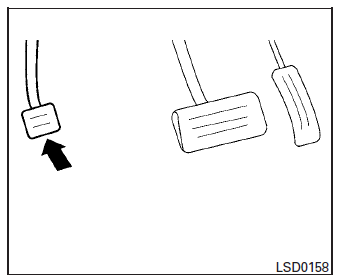
Parking brake
To engage: Firmly depress the parking brake.
To release:
- Firmly apply the foot brake.
- Move the shift lever to the P (Park) position.
- Firmly depress the parking brake pedal and it will release.
- Before driving, be sure the brake warning light goes out.
 Driving the vehicle
CONTINUOUSLY VARIABLE
TRANSMISSION (CVT)
The Continuously Variable Transmission (CVT) in
your vehicle is electronically controlled to produce
maximum power and smooth operation.
The recommended ...
 ECO mode switch (if so equipped)
ECO mode switch
The ECO mode helps to enhance the fuel
economy by controlling the throttle sensitivity and
transmission points.
To turn on the ECO mode, push the ECO mode
switch. The ECO mo ...
Other materials:
Adjust
For adjustable head restraint/headrest
Adjust the head restraint/headrest so the center
is level with the center of your ears. If your ear
position is still higher than the recommended
alignment, place the head restraint/headrest at
the highest position.
For non-adjustable head restraint ...
TCM
Exploded View
Bracket
Bracket
TCM
: Vehicle front
: N·m (kg-m, in-lb)
Removal and Installation
CAUTION:
Do not impact the TCM when removing or installing TCM.
When replacing TCM and transaxle assembly as a set, replace
transaxle assembly first and then
rep ...
Room lamp
Removal and Installation
WARNING:
Do not touch the glass surface of a bulb while it is lit or right after being
turned OFF to prevent burns.
CAUTION:
Do not touch the glass of bulb directly by hand. Keep grease
and other oily substances away from
bulb surface.
Do not le ...
