
Nissan Rogue Service Manual: Moonroof switch
Description
Transmits switch operation signal to moonroof motor and sunshade motor assembly.
Diagnosis Procedure
Regarding Wiring Diagram information, refer to RF-17, "Wiring Diagram".
1.CHECK MOONROOF SWITCH INPUT SIGNAL
- Turn ignition switch ON.
- Check voltage between moonroof motor assembly harness connector and ground.
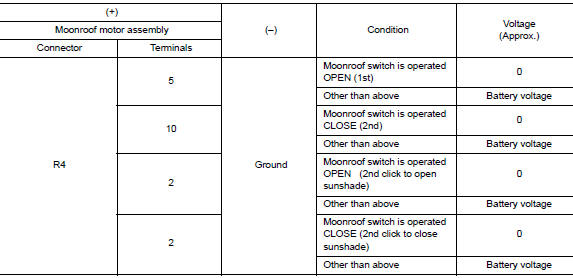
Is the inspection result normal? YES >> Inspection End.
NO >> GO TO 2.
2.CHECK MOONROOF SWITCH CIRCUIT
- Turn ignition switch OFF.
- Disconnect moonroof motor assembly connector and moonroof switch connector.
- Check continuity between moonroof motor assembly harness connector and moonroof switch harness connector.

- Check continuity between moonroof motor assembly harness connector and ground.

Is the inspection result normal? YES >> GO TO 3.
NO >> Repair or replace the harness.
3.CHECK MOONROOF SWITCH GROUND CIRCUIT
Check continuity between moonroof switch harness connector and ground.

Is the inspection result normal? YES >> GO TO 4.
NO >> Repair or replace the harness.
4.CHECK MOONROOF SWITCH
Check moonroof switch.
Refer to RF-32, "Component Inspection".
Is the inspection result normal? YES >> GO TO 5.
NO >> Replace moonroof switch. Refer to RF-64, "Removal and Installation".
5.CHECK INTERMITTENT INCIDENT
Refer to GI-41, "Intermittent Incident".
>> Inspection End.
Component Inspection
MOONROOF SWITCH
1. CHECK MOONROOF SWITCH
- Turn ignition switch OFF.
- Disconnect moonroof switch.
- Check continuity between moonroof switch terminals.
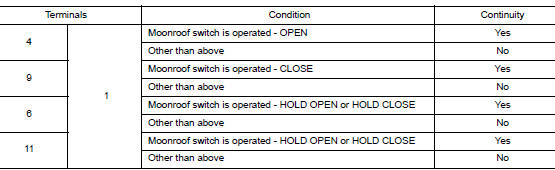
Is the inspection result normal? YES >> Moonroof switch is OK.
NO >> Replace moonroof switch. Refer to RF-64, "Removal and Installation".
 Power supply and ground circuit
BCM (BODY CONTROL SYSTEM) (WITH INTELLIGENT KEY SYSTEM)
BCM (BODY CONTROL SYSTEM) (WITH INTELLIGENT KEY SYSTEM) : Diagnosis
Procedure
Regarding Wiring Diagram information, refer to BCS-50, "Wi ...
 Door switch
WITH INTELLIGENT KEY
WITH INTELLIGENT KEY : Component Function Check
1.CHECK FUNCTION
Select "DOOR LOCK" of "BCM" using CONSULT.
Select "DOOR SW-DR", ...
Other materials:
Precaution
Precaution for Supplemental Restraint System (SRS) "AIR BAG" and "SEAT
BELT
PRE-TENSIONER"
The Supplemental Restraint System such as “AIR BAG� and “SEAT BELT PRE-TENSIONER�,
used along
with a front seat belt, helps to reduce the risk or severity of injury to the
...
Seatback pockets
Seatback pockets
There is a pocket located on the back of the driver
and passenger seats. These pockets can be
used to store maps.
WARNINGTo ensure proper operation of the passenger’s
advanced air bag system, please observe
the following items:
Do not allow a pas ...
Symptom diagnosis
AUDIO SYSTEM
Symptom Table
RELATED TO AUDIO
Symptoms
Check items
Probable malfunction location
The disk cannot be removed
Audio unit
Malfunction in audio unit.
Refer to AV-18, "On Board Diagnosis Function".
No sound comes out or the le ...
