
Nissan Rogue Owners Manual: Liftgate release
WARNING
|
CAUTION
|
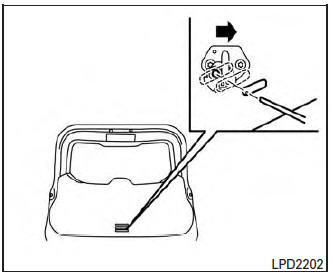
Liftgate release (manual and power)
The liftgate release mechanism allows the liftgate to be opened in the event of a discharged battery.
To release the liftgate from the inside of the vehicle, perform the following operations:
- Fold the rear seats down. For additional information, refer to “Folding 3rd row bench (if so equipped)� in the “Safety—seats, seat belts and supplemental restraint system� section of this manual.
- Insert a suitable tool in the access opening.
Move the release lever to the right. The liftgate will be unlatched.
- Push the liftgate up to open.
NOTE: If you had to open the liftgate using this lever, have your vehicle checked by a NISSAN dealer as soon as possible.
Liftgate position setting
The liftgate can be set to open to a specific height by performing the following:
- Open the liftgate using the request switch or the Intelligent Key.
- Pull the liftgate down to the desired position and hold the liftgate (the liftgate will have some resistance when being manually adjusted).
- While holding the liftgate in position, press
and hold the liftgate switch
 located
on the liftgate for approximately 5 seconds
or until three beeps are heard.
located
on the liftgate for approximately 5 seconds
or until three beeps are heard.
The liftgate will open to the selected position setting. To change the position of the liftgate, repeat Ste for setting the position of the liftgate.
 Power liftgate main switch
Power liftgate main switch
The power liftgate operation can be turned on or
off by the power liftgate main switch on the
instrument panel.
When the power liftgate main switch is pushed to
t ...
 Fuel-filler door
Opener operation
Opener operation
The fuel-filler lid release is located below the
instrument panel. To open the fuel-filler lid, pull
the release. To lock, close the fuel-filler lid securely. ...
Other materials:
Windshield wiper blades
Cleaning
If your windshield is not clear after using the
windshield-washer or if a wiper blade chatters
when running, wax or other material may be on
the blade or windshield.
Clean the outside of the windshield with a washer
solution or a mild detergent. Your windshield is
clean if beads d ...
Precaution
Precaution for Supplemental Restraint System (SRS) "AIR BAG" and "SEAT
BELT
PRE-TENSIONER"
The Supplemental Restraint System such as “AIR BAG� and “SEAT BELT PRE-TENSIONER�,
used along
with a front seat belt, helps to reduce the risk or severity of injury to the
...
Rapid air pressure loss
Rapid air pressure loss or a “blow-out� can occur
if the tire is punctured or is damaged due to
hitting a curb or pothole. Rapid air pressure loss
can also be caused by driving on under-inflated
tires.
Rapid air pressure loss can affect the handling
and stability of the vehicle, especial ...
