
Nissan Rogue Service Manual: Instrument lower panel LH
Removal and Installation
REMOVAL
- Release instrument side finisher (LH) (1) pawls using a suitable
tool and remove.
 : Pawl

- Remove bolts (A) and fuel filler lid/hood lock release handle (1) from instrument lower panel LH.

- Remove data link cover from the instrument lower panel LH.
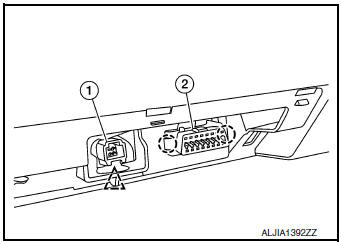
- Release the clip using a suitable tool and remove accessory
connector (1) from insturment lower panel LH.
 : Clip
 - Release the pawls using a suitable tool and remove data link
connector (2) from instrument lower panel LH.: Pawl
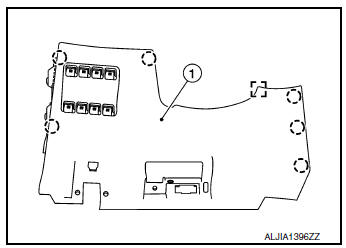
- Release the clips and pawls using a suitable tool, disconnect the harness connector and remove instrument lower panel LH (1).
: Pawl
 : Metal clip
INSTALLATION
Installation is in the reverse order of removal.
 Cluster lid C
Exploded View
Audio unit (AUDIO WITHOUT BOSE) /
AV control unit (AUDIO WITH BOSE)
(NAVIGATION WITH BOSE)
A/C switch assembly (AUTOMATIC
AIR CONDITIONING) / front air control
(M ...
 Glove box assembly and housing
Removal and Installation
REMOVAL
Release instrument side finisher (RH) (1) pawls using a suitable
tool and remove.
: Pawl
NOTE:
LH side shown; RH similar.
Release the glove box ...
Other materials:
Cluster lid C
Exploded View
Audio unit (AUDIO WITHOUT BOSE) /
AV control unit (AUDIO WITH BOSE)
(NAVIGATION WITH BOSE)
A/C switch assembly (AUTOMATIC
AIR CONDITIONING) / front air control
(MANUAL AIR CONDITIONING)
Cluster lid C
Removal and Installation
REMOVAL
Release ...
Power panoramic moonroof (if so equipped)
The moonroof will only operate when the ignition
switch is placed in the ON position. The moonroof
is operational for a period of time, even if the
ignition switch is placed in the ACC (if so
equipped) or OFF position. If the driver’s door or
the front passenger’s door is opened during ...
Hill start assist system
Hill start assist system
WARNING
Never rely solely on the hill start assist
system to prevent the vehicle from moving
backward on a hill. Always drive
carefully and attentively. Depress the
brake pedal when the vehicle is stopped
on a steep hill. Be especial ...
