
Nissan Rogue Owners Manual: Instrument brightness control
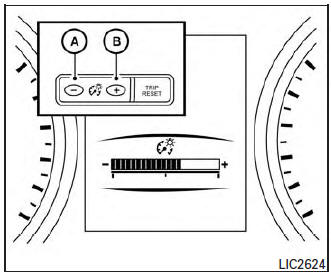
Instrument brightness control
Push the “-� button A to decrease the brightness of instrument panel lights when driving at night.
Push the “+� button B to increase the brightness of instrument panel lights when driving at night.
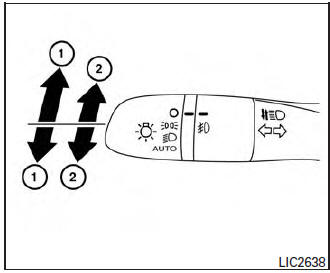
Turn signal switch
Turn signal
- Move the lever up or down to signal the turning direction. When the turn is completed, the turn signal cancels automatically.
Lane change signal
- To signal a lane change, move the lever up or down to the point where the indicator light begins to flash, but the lever does not latch.
The turn signal will flash three times automatically.
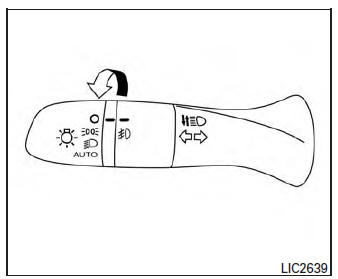
Fog light switch (if so equipped)
To turn the fog lights on, turn the headlight switch
to the  position, then turn the fog
light
switch to the
position, then turn the fog
light
switch to the  position.
To turn the fog lights on with the headlight switch in
the AUTO position, the headlights must be on, then
turn the fog light switch to the  position.
To turn the fog lights off, turn the fog light switch to the OFF position.
The headlights must be on and the low beams selected for the fog lights to operate. The fog lights automatically turn off when the high beam headlights are selected
 Daytime running light system
The daytime running lights automatically illuminate
when the engine is started with the parking
brake released. The daytime running lights operate
with the headlight switch in the OFF position
or ...
 Horn
Horn
To sound the horn, push near the horn icon on the
steering wheel.
WARNINGDo not disassemble the horn. Doing so
could affect proper operation of the
supplemental front air bag system. ...
Other materials:
Battery terminal with fusible link
Exploded View
Cover
Fusible link box (battery)
Positive cable
Battery
Harness connector
Front
Removal and Installation
REMOVAL
Loosen battery terminal nuts and disconnect both negative and
positive terminals from the battery.
CAUTION:
To prevent ...
Passenger side door mirror defogger
Description
Heats the heating wire with the power supply from the rear window defogger
relay to prevent the door mirror
from fogging up.
Component Function Check
1.CHECK DOOR MIRROR DEFOGGER RH
Check that the heating wire of door mirror defogger RH is heated when turning
the rear window def ...
P0182, P0183 FTT sensor
DTC Description
DTC DETECTION LOGIC
DTC No.
CONSULT screen terms
(Trouble diagnosis content)
DTC detecting condition
P0182
FTT SEN/CIRCUIT
(Fuel temperature sensor ″A″ circuit low)
An excessively low voltage from the sensor is sent to ECM.
P01 ...
