
Nissan Rogue Owners Manual: NISSAN Intelligent Key® (if so equipped)
Your vehicle can only be driven with the Intelligent Keys which are registered to your vehicle’s Intelligent Key system components and NISSAN Vehicle Immobilizer System components. As many as four Intelligent Keys can be registered and used with one vehicle. The new keys must be registered by a NISSAN dealer prior to use with the Intelligent Key system and NISSAN Vehicle Immobilizer System of your vehicle. Since the registration process requires erasing all memory in the Intelligent Key components when registering new keys, be sure to take all Intelligent Keys that you have to the NISSAN dealer.
A key number plate is supplied with your keys.
Record the key number and keep it in a safe place (such as your wallet), not in the vehicle. If you lose your keys, see a NISSAN dealer for duplicates by using the key number. NISSAN does not record key numbers so it is very important to keep track of your key number plate.
A key number is only necessary when you have lost all keys and do not have one to duplicate from. If you still have a key, your NISSAN dealer can duplicate it.
| CAUTION Listed below are conditions or occurrences which will damage the Intelligent Key:
If an Intelligent Key is lost or stolen, NISSAN recommends erasing the ID code of that Intelligent Key from the vehicle. This may prevent the unauthorized use of the Intelligent Key to operate the vehicle. For information regarding the erasing procedure, contact a NISSAN dealer. |
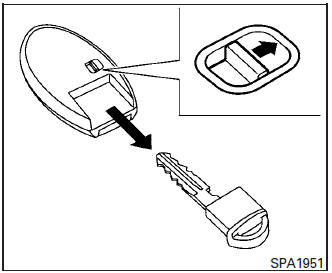
Mechanical key
The Intelligent Key contains the mechanical key.
To remove the mechanical key, release the lock knob on the back of the Intelligent Key.
To install the mechanical key, firmly insert it into the Intelligent Key until the lock knob returns to the lock position.
Use the mechanical key to lock or unlock the driver’s door.
| CAUTION Always carry the mechanical key installed in the Intelligent Key slot. |
For additional information, refer to “Doors� in this section.
 Remote keyless entry (if so equipped)
CAUTIONDo not leave the ignition key inside the
vehicle when you leave the vehicle.
key number plate is supplied with your keys.
Record the key number and keep it in a safe place
( ...
 NISSAN Vehicle Immobilizer System keys
You can only drive your vehicle using the master
keys which are registered to the NISSAN Vehicle
Immobilizer System components in your vehicle.
These keys have a transponder chip in the key
head ...
Other materials:
Basic inspection
DIAGNOSIS AND REPAIR WORK FLOW
Work Flow
OVERALL SEQUENCE
DETAILED FLOW
1.OBTAIN INFORMATION ABOUT SYMPTOM
Interview the customer to obtain as much information as possible about the
conditions and environment under
which the malfunction occurred.
>> GO TO 2.
2.CHECK SYMPTOM
...
Changing engine oil filter
>
Changing engine oil filter
Park the vehicle on a level surface and apply
the parking brake.
Turn the engine off.
Place a large drain pan under the oil filter B .
Remove pins C from the right engine protector
located inside right wheel well, remove
protector. Remove oil ...
Roof side molding
Exploded View
Roof side molding
Back door hinge cover
Metal clip
Pawl
Removal and Installation
REMOVAL
Release roof side molding (1) using suitable tool (A) then
remove roof side molding.
: Metal clip
CAUTION:
Apply protective tape (B) around the roof side moldi ...
