
Nissan Rogue Owners Manual: Hood
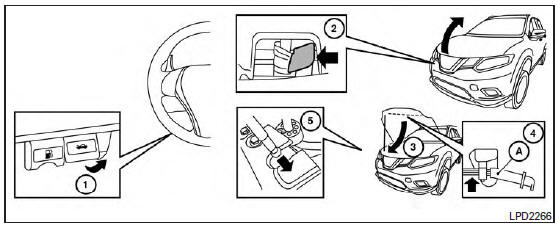
Hood
- Pull the hood lock release handle 1 located below the instrument panel until the hood springs up slightly.
- Locate the lever 2 in between the hood and grille and push the lever sideways with your fingertips.
- Raise the hood 3 .
- Remove the support rod 4 and insert it into the slot 5 .
Hold the coated parts A when removing or resetting the support rod. Avoid direct contact with the metal parts, as they may be hot immediately after the engine has been stopped.
When closing the hood, return the support rod to its original position, lower the hood to approximately 12 in (30 cm) above the latch and release it. This allows proper engagement of the hood latch.
WARNING
|
 Troubleshooting guide
Verify the location of all Intelligent Keys that are
programmed for the vehicle. If another Intelligent
Key is in range or inside the vehicle, the vehicle
system may respond differently than expect ...
 Liftgate
WARNING
Always be sure the liftgate has been
closed securely to prevent it from opening
while driving.
Do not drive with the liftgate open. This
could allow dang ...
Other materials:
Basic inspection
DIAGNOSIS AND REPAIR WORKFLOW
Work Flow
OVERALL SEQUENCE
DETAILED FLOW
1. GET INFORMATION FOR SYMPTOM
Get the detailed information from the customer about the symptom (the
condition and the environment when
the incident/malfunction occurred).
>> GO TO 2.
2. CHECK DTC
...
Operating range
Operating range
The Intelligent Key functions can only be used
when the Intelligent Key is within the specified
operating range from the request switch 1 .
When the Intelligent Key battery is discharged or
strong radio waves are present near the operating
location, the Intelligent Key op ...
P117A air fuel ratio
DTC Description
DTC DETECTION LOGIC
DTC No.
CONSULT screen terms
(Trouble diagnosis content)
DTC detecting condition
P117A
AIR FUEL RATIO B1
(AIR FUEL RATIO B1)
ECM detects a lean/rich air fuel ratio state in any cylinder for a
specified
length of time.
...
