
Nissan Rogue Service Manual: Diagnosis system (BCM) (with intelligent key system)
COMMON ITEM
COMMON ITEM : CONSULT Function (BCM - COMMON ITEM)
APPLICATION ITEM
CONSULT performs the following functions via CAN communication with BCM.
|
Direct Diagnostic Mode |
Description |
| Ecu Identification | The BCM part number is displayed. |
| Self Diagnostic Result | The BCM self diagnostic results are displayed. |
| Data Monitor | The BCM input/output data is displayed in real time. |
| Active Test | The BCM activates outputs to test components. |
| Work support | The settings for BCM functions can be changed. |
| Configuration |
|
| CAN Diag Support Mntr | The result of transmit/receive diagnosis of CAN communication is displayed. |
APPLICATION ITEM
CONSULT performs the following functions via CAN communication with BCM.
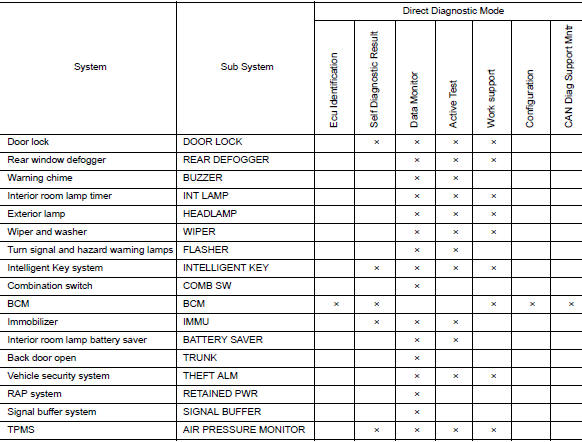
RETAINED PWR
RETAINED PWR : CONSULT Function (BCM - RETAINED PWR)
DATA MONITOR
|
Monitor Item [Unit] |
Description |
| DOOR SW-DR [On/Off] | Indicates condition of front door switch LH. |
| DOOR SW-AS [On/Off] | Indicates condition of front door switch RH. |
 System
System Description
SYSTEM DIAGRAM
POWER WINDOW OPERATION
Main power window and door lock/unlock switch can open/close all
windows.
Front and rear power window switches can open/cl ...
 Diagnosis system (BCM) (without intelligent key system)
COMMON ITEM
COMMON ITEM : CONSULT Function (BCM - COMMON ITEM)
APPLICATION ITEM
CONSULT performs the following functions via CAN communication with BCM.
Direct Diagnostic Mode
De ...
Other materials:
Seatback pockets
Seatback pockets
There is a pocket located on the back of the driver
and passenger seats. These pockets can be
used to store maps.
WARNINGTo ensure proper operation of the passenger’s
advanced air bag system, please observe
the following items:
Do not allow a pas ...
The steering switches are inoperative
Description
One or more of the steering switches to control the information display are
inoperative.
Diagnosis Procedure
1.CHECK STEERING SWITCH CIRCUIT
Check steering switch circuit. Refer to MWI-69, "Diagnosis Procedure".
Is the inspection result normal?
YES >> GO TO 2.
...
Symptom diagnosis
THE SPORT MODE INDICATOR LAMP DOES NOT TURN ON
Description
The SPORT mode indicator lamp does not turn ON when the SPORT mode switch is
operated.
Diagnosis Procedure
1.CHECK SPORT MODE INDICATOR LAMP FUNCTION
Perform combination meter self-diagnosis mode and check test order 10. Refer
to MW ...
