
Nissan Rogue Service Manual: Diagnosis and repair work flow
Work Flow
OVERALL SEQUENCE
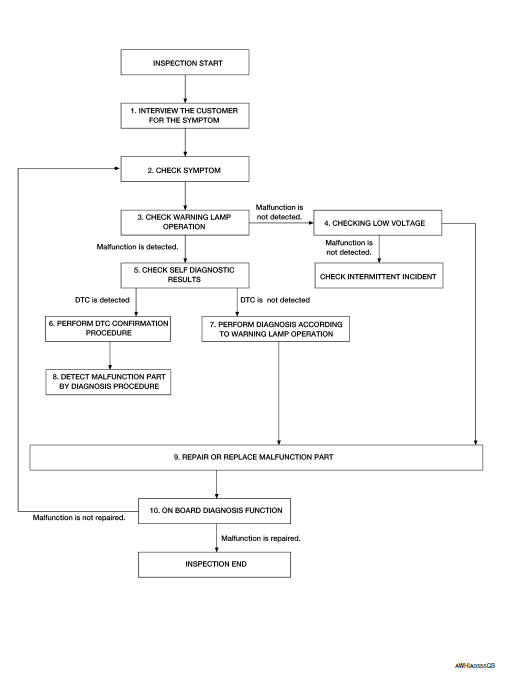
DETAILED FLOW
1.INTERVIEW THE CUSTOMER FOR THE SYMPTOM
Interview the customer for the symptom (the condition and the environment when the incident/malfunction occurs).
>> GO TO 2.
2.CHECK SYMPTOM
Check the symptom from the customer information.
>> GO TO 3.
3.CHECK WARNING LAMP OPERATION
Check air bag warning lamp operation in the user mode.
Are any malfunction detected? YES >> GO TO 5.
NO >> GO TO 4.
4.CHECK LOW VOLTAGE
Check low voltage with CONSULT.
Are any malfunction detected? YES >> GO TO 9.
NO >> Check intermittent incident. Refer to GI-41, "Intermittent Incident".
5.CHECK SELF DIAGNOSTIC RESULTS
Check self diagnostic result with CONSULT or diagnosis mode.
If it is impossible to switch to diagnosis mode, follow the same procedure that DTC is not detected.
NOTE: Perform the following procedure if DTC is detected.
- Record DTC (Print them out with CONSULT.)
- Erase self diagnostic result.
- Study the relationship between the malfunction that DTC or air bag warning lamp indicates and the symptom that the customer describes.
- Check related service bulletins for information.
Is DTC detected? YES >> GO TO 6.
NO >> GO TO 7.
6.PERFORM DTC CONFIRMATION PROCEDURE
Perform DTC CONFIRMATION PROCEDURE for the DTC.
>> GO TO 8.
7.PERFORM DIAGNOSIS ACCORDING TO WARNING LAMP OPERATION
- Check air bag warning lamp operation in the user mode.
- Perform Diagnosis Procedure for the air bag warning lamp operation.
>> GO TO 9.
8.DETECT MALFUNCTIONING PART BY DIAGNOSTIC PROCEDURE
Inspect according to Diagnostic Procedure of the DTC.
>> GO TO 9.
9.REPAIR OR REPLACE THE MALFUNCTION PART
Repair or replace the malfunctioning part.
>> GO TO 10.
10.ON BOARD DIAGNOSIS FUNCTION
Check self diagnostic result and air bag warning lamp operation in the user mode.
Is the malfunction repaired? YES >> Inspection End.
NO >> GO TO 2.
 Basic inspection
...
 Inspection and adjustment
ADDITIONAL SERVICE WHEN REPLACING CONTROL UNIT
ADDITIONAL SERVICE WHEN REPLACING CONTROL UNIT : Description
When replacing the occupant classification system control unit, perform
zero point r ...
Other materials:
C1113, C1145, C1146 yaw rate/side/decel G sensor
DTC
Display Item
Malfunction detected condition
Possible causes
C1113
G SENSOR
When a malfunction is detected in longitudinal G sensor
signal.
Harness or connector
Yaw rate/side/decel G sensor
• ABS actuator and electric unit
(control ...
P2814 select solenoid
DTC Description
DTC DETECTION LOGIC
DTC
CONSULT screen terms
(Trouble diagnosis content)
DTC detection condition
P2814
SELECT SOLENOID
(Select solenoid)
When all of the following conditions are satisfied and this state is
maintained
for 0.48 seconds:
&n ...
Rear disc brake
BRAKE PAD
BRAKE PAD : Exploded View
Sliding pin bolt
Sliding pin bushing
Cylinder body
Inner shim cover
Inner shim
Inner pad
Pad retainer
Torque member
Outer pad
Outer shim
Outer shim cover
Molykote AS-880N
Niglube Rx-2
BRAKE PAD : Re ...
