
Nissan Rogue Service Manual: Consult/gst checking system
Description
NOTE: This vehicle is diagnosed using the CONSULT-III plus.
- When CONSULT is connected with a data link connector equipped on the vehicle side, it will communicate with the control unit equipped in the vehicle and then enable various kinds of diagnostic tests.
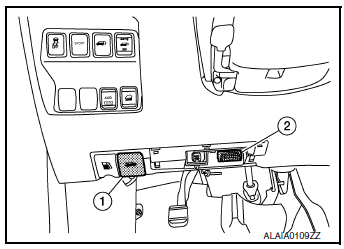
- Hood release handle
- Data link connector
- Refer to “CONSULT-III plus Operation Manual� for more information.
Function and System Application
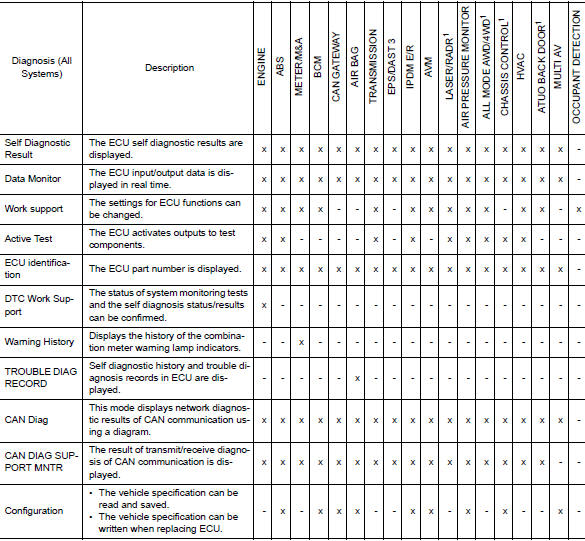
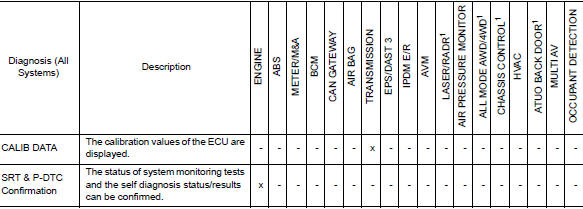
x: Applicable
1: If equipped
CONSULT Data Link Connector (DLC) Circuit
INSPECTION PROCEDURE
If the CONSULT cannot diagnose the system properly, check the following items.
| Symptom | Check item |
| CONSULT cannot access any system. |
|
| CONSULT cannot access individual system. (Other systems can be accessed.) |
|
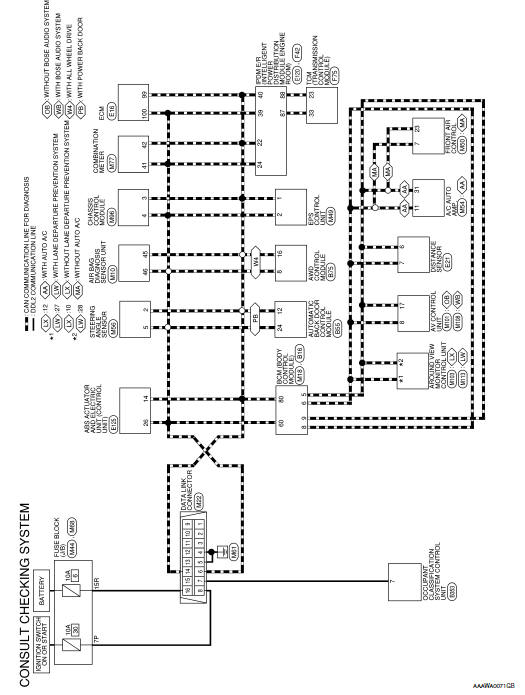
NOTE: The DDL2 circuits and CAN communication lines from DLC pins 6, 7 and 14 may be connected to more than one system. A short in a DDL circuit or CAN lines connected to a control unit in one system may affect CONSULT access to other systems. For a complete DDL circuit layout, refer to GI-51, "Wiring Diagram - CONSULT/ GST CHECKING SYSTEM". For a complete CAN line layout, refer to LAN-35, "Wiring Diagram - CAN SYSTEM -".
Wiring Diagram - CONSULT/GST CHECKING SYSTEM
 Circuit inspection
DESCRIPTION
In general, testing electrical circuits is an easy task if it is
approached in a logical and organized method.
Before beginning it is important to have all available informa ...
 Engine
...
Other materials:
Precaution
Precaution for Supplemental Restraint System (SRS) "AIR BAG" and "SEAT
BELT
PRE-TENSIONER"
The Supplemental Restraint System such as “AIR BAG� and “SEAT BELT PRE-TENSIONER�,
used along
with a front seat belt, helps to reduce the risk or severity of injury to the
...
Body component parts
Underbody Component Parts
Both sided anti-corrosive
precoated steel portions
High strength steel (HSS)
portions: 440 MPa
Both sided anti-corrosive
steel and HSS portions: 440 MPa
CAUTION:
If the high strength steel (ultra high strength steel) of this is broken,
replace by assem ...
System description
COMPONENT PARTS
Component Parts Location
Center of back door
View with glove box removed
No
Component
Function
1
Rod antenna
Refer to AV-232, "Rod Antenna, Antenna Amp., Satellite
Antenna and Antenna Feeder".
2
Antenna ...
