
Nissan Rogue Service Manual: Compressor
Exploded View
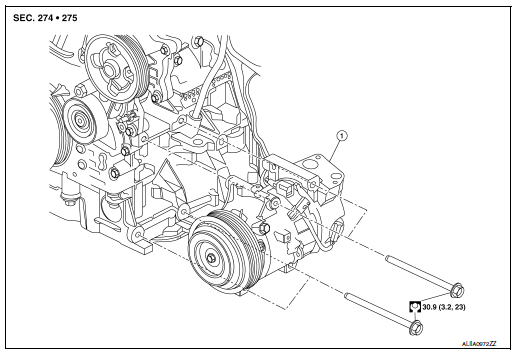
- Compressor
Removal and Installation
REMOVAL
- Discharge the refrigerant. Refer to HA-23, "Recycle Refrigerant".
- Remove the engine under cover. Refer to EXT-37, "ENGINE UNDER COVER : Removal and Installation".
- Release the drive belt from the compressor. Refer to EM-13,
"Removal and Installation".
NOTE: Complete removal of the drive belt is not necessary.
- Partially remove the front fender protector (RH). Refer to EXT-28, "FENDER PROTECTOR : Removal and Installation".
- Remove the nut (A) that retains the low-pressure flexible hose to
the compressor.
CAUTION: Cap or wrap the joint of the pipe with suitable material such as vinyl tape to avoid the entry of air.
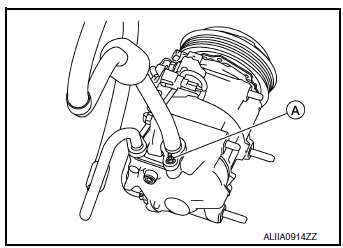
- Remove the bolt (A) that retains the high-pressure flexible hose (2) to the compressor (1).
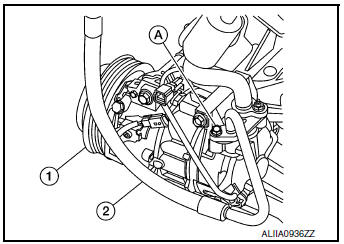
- Disconnect the harness connectors from the compressor.
- Remove bolts and compressor.
INSTALLATION
Installation is in the reverse order of removal.
CAUTION:
- Tighten nut/bolt to specification. Refer to HA-32, "Exploded View".
- Do not reuse O-rings.
- Apply A/C oil to new O-rings for installation.
- After charging refrigerant, check for leaks. Refer to HA-21, "Leak Test".
- After installation, check the tension of the drive belt. Refer to EM-13, "Checking".

 Cooler pipe and hose
Exploded View
Condenser
High-pressure flexible hose
Low-pressure flexible hose
Low-pressure pipe
Heating and cooling unit assembly
High-pressure pipe
Compressor
...
Other materials:
Unit removal and installation
TRANSFER ASSEMBLY
Exploded View
1 Transfer assembly
: N·m (kg-m, ft-lb)
*: Apply anti-corrosion oil.
Removal and Installation
NOTE:
When removing components such as hoses, tubes/lines, etc., cap or plug openings
to prevent fluid from spilling.
REMOVAL
Remove front drive shaf ...
Main power window and door lock/unlock switch
Removal and Installation
REMOVAL
Remove the front door pull handle bracket (LH). Refer to INT-15,
"Removal and Installation".
Release pawls using a suitable tool (A) and remove main power
window and door lock/unlock switch finisher (1).
: Pawl
Disconnect t ...
Diagnosis system (BCM) (with intelligent key system)
COMMON ITEM
COMMON ITEM : CONSULT Function (BCM - COMMON ITEM)
APPLICATION ITEM
CONSULT performs the following functions via CAN communication with BCM.
Direct Diagnostic Mode
Description
Ecu Identification
The BCM part number is displayed.
Self Diagnostic ...
