
Nissan Rogue Owners Manual: Checking engine oil level
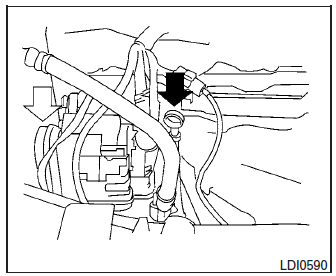
Checking engine oil level
- Park the vehicle on a level surface and apply the parking brake.
- Start the engine and let it idle until it reaches operating temperature.
- Turn off the engine. Wait more than 10 minutes for the oil to drain back into the oil pan.
- Remove the dipstick and wipe it clean. Reinsert it all the way.
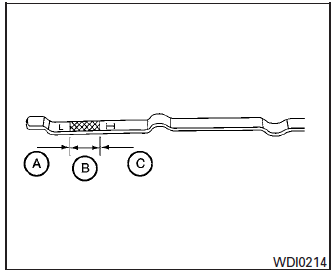
- Remove the dipstick again and check the oil level. It should be between the H (High) and L (Low) marks B . This is the normal operating oil level range. If the oil level is below the L (Low) mark A , remove the oil filler cap and pour recommended oil through the opening. Do not overfill C .
- Recheck oil level with the dipstick.
It is normal to add some oil between oil maintenance intervals or during the break-in period, depending on the severity of operating conditions.
| CAUTION Oil level should be checked regularly. Operating the engine with an insufficient amount of oil can damage the engine, and such damage is not covered by warranty. |
 Engine oil
...
 Changing engine oil
Changing engine oil
Park the vehicle on a level surface and apply
the parking brake.
Start the engine and let it idle until it reaches
operating temperature, then turn it off.
& ...
Other materials:
B0093 front door satellite sensor LH
DTC Logic
DTC DETECTION LOGIC
With CONSULT
CONSULT name
DTC
DTC detecting condition
Repair order
DOOR SATELLITE SENSOR LH
[SENSOR FAIL]
B0093
Front door satellite sensor LH has malfunctioned.
Refer to SRC-70, "Diagnosis Procedure".
...
The liftgate open warning continues displaying, or does
not display
Description
The liftgate open warning is displayed continuously even though the
liftgate is closed.
The liftgate open warning is not displayed even though the
liftgate is open.
Diagnosis Procedure
1.CHECK BCM INPUT SIGNAL
Check the BCM input signal. Refer to DLK-149, "Com ...
Removal and installation
ECM
Removal and Installation
EXPLODED VIEW
1 ECM bracket
2 ECM
: Vehicle front
CAUTION:
Perform ADDITIONAL SERVICE WHEN REPLACING ECM. Refer to EC-136, "Work
Procedure".
REMOVAL
Disconnect the battery negative terminal.
Remove the resonator. Refer to EM-24 ...
