
Nissan Rogue Service Manual: Calibration of decel G sensor
Description
CAUTION: Always perform the decel G sensor calibration before driving when the following operation is performed.
NOTE: Yaw rate/side/decel G sensor calibration is performed when performing the decel G sensor calibration.
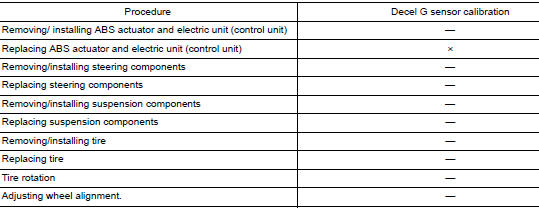
Work Procedure
Decel G sensor calibration
CAUTION: Always use CONSULT for the decel G sensor calibration. (It cannot be adjusted other than with CONSULT.) NOTE: Yaw rate/side/decel G sensor calibration is performed when performing the decel G sensor calibration.
1.CHECK THE VEHICLE STATUS
- Steer the steering wheel to the straight-ahead position. Stop the vehicle on level surface.
- Stop the engine.
- Turn the ignition switch OFF.
Is the vehicle stopped in the straight-ahead position on level surface? YES >> GO TO 2.
NO >> Steer the steering wheel to the straight-ahead position. Stop the vehicle on level surface.
2.PERFORM DECEL G SENSOR CALIBRATION
CAUTION:
- Never allow passenger or load on the vehicle.
- Never apply vibration to the vehicle body when opening or closing door during calibration.
 With CONSULT
- Turn the ignition switch ON.
CAUTION: Never start engine.
- Select “ABS�, “WORK SUPPORT�, “DECEL G SEN CALIBRATION� in this order.
- Select “START�.
- After approx. 10 seconds, select “END�.
- Turn ignition switch OFF and then turn it ON again.
CAUTION: Be sure to perform the operation above. >> GO TO 3.
3.CHECK DATA MONITOR
With CONSULT
- Drive the vehicle. Steer the steering wheel to the straight-ahead position. Stop the vehicle on level surface.
- Select “ABS�, “DATA MONITOR�, “ECU INPUT SIGNALS� and “DECEL G SENSOR� in this order. Check that the signal is within the specified value.
DECEL G SENSOR : Approx. ± 0.01 G
Is the inspection result normal? YES >> GO TO 4.
NO >> GO TO 1.
4.ERASE SELF-DIAGNOSIS MEMORY
With CONSULT
Erase self-diagnosis result of “ABS�.
Are the memories erased? YES >> Inspection End.
NO >> Check the items indicated by the self-diagnosis.
 Adjustment of steering angle sensor neutral position
Description
Refer to the table below to determine if adjustment of steering angle sensor
neutral position is required.
Work Procedure
ADJUSTMENT OF STEERING ANGLE SENSOR NEUTRAL POSITION
CAU ...

Other materials:
Off-road recovery
If the right side or left side wheels unintentionally
leave the road surface, maintain control of the
vehicle by following the procedure below. Please
note that this procedure is only a general guide.
The vehicle must be driven as appropriate based
on the conditions of the vehicle, road and t ...
General maintenance
During the normal day-to-day operation of the
vehicle, general maintenance should be performed
regularly as prescribed in this section. If
you detect any unusual sounds, vibrations or
smells, be sure to check for the cause or have a
NISSAN dealer do it promptly. In addition, you
should notify ...
FCW system operation
Forward Collision Warning light
The FCW system is active at speeds of approximately
10 MPH (15 km/h) and above, when the
system turns on.
When FCW is turned on, FCW Indicator (white)
will turn on. FCW system is activated using the
settings menu on the information display. For
additional ...
