
Nissan Rogue Service Manual: Basic inspection
DIAGNOSIS AND REPAIR WORK FLOW
Work Flow
DETAILED FLOW
1.INTERVIEW FROM THE CUSTOMER
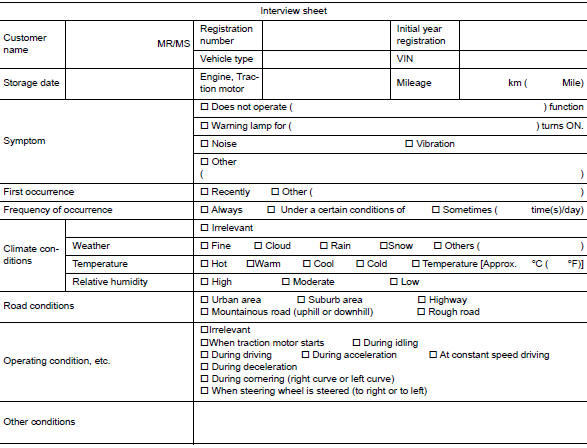
Clarify customer complaints before inspection. First of all, perform an interview utilizing DAS-202, "Diagnostic Work Sheet" and reproduce the symptom as well as fully understand it. Ask customer about his/her complaints carefully. Check symptoms by driving vehicle with customer, if necessary.
CAUTION: Customers are not professional. Never guess easily like “maybe the customer means that...,” or “maybe the customer mentions this symptom”.
>> GO TO 2.
2.CHECK SYMPTOM
Reproduce the symptom that is indicated by the customer, based on the information from the customer obtained by the interview. Also check that the symptom is not caused by fail-safe mode. Refer to DAS-191, "Fail-Safe (Chassis Control Module)".
CAUTION: When the symptom is caused by normal operation, fully inspect each portion and obtain the understanding of customer that the symptom is not caused by a malfunction. >> GO TO 3.
3.PERFORM SELF-DIAGNOSIS
 With CONSULT
- Perform “Self Diagnostic Result“ for “CHASSIS CONTROL“.
Is DTC detected? YES >> Record or print self-diagnosis results and freeze frame data (FFD). GO TO 4.
NO >> Inspection End.
4.RECHECK THE SYMPTOM
 With CONSULT
Perform DTC confirmation procedures for the malfunctioning system.
NOTE: If some DTCs are detected at the some time, determine the order for performing the diagnosis based on DAS- 193, "DTC Inspection Priority Chart". Is DTC detected? YES >> GO TO 5.
NO >> Check harness and connectors based on the information obtained by the interview. Refer to DAS- 171, "Precautions for Harness Repair".
5.REPAIR OR REPLACE MALFUNCTIONING PARTS
- Repair or replace malfunctioning parts.
- Reconnect part or connector after repairing or replacing.
- When DTC is detected, erase “Self Diagnostic Result“ for “CHASSIS CONTROL”.
>> GO TO 6.
6.FINAL CHECK
 With CONSULT
- Check the reference value for “CHASSIS CONTROL”.
- Recheck the symptom and check that the symptom is not reproduced on the same conditions.
Is the symptom reproduced? YES >> GO TO 3.
NO >> Inspection End.
Diagnostic Work Sheet
Description
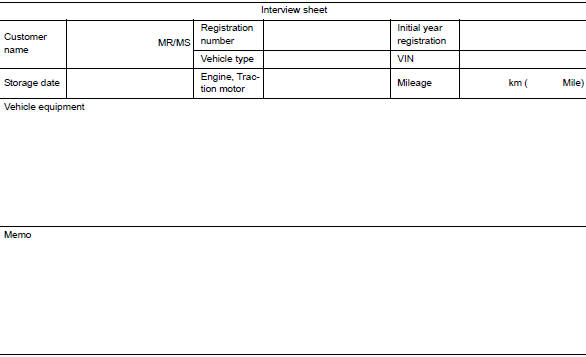
- In general, customers have their own criteria for a symptom. Therefore, it is important to understand the symptom and status well enough by interviewing the customer about the symptom carefully. To systemize all the information for the diagnosis, prepare the interview sheet referring to the interview points.
- In some cases, multiple conditions that appear simultaneously may cause a DTC to be detected.
INTERVIEW SHEET SAMPLE
ADDITIONAL SERVICE WHEN REPLACING CHASSIS CONTROL MODULE
Description
When replaced the chassis control module, configuration of the chassis control module is required. Refer to DAS-205, "Work Procedure".
CONFIGURATION (CHASSIS CONTROL MODULE)
Work Procedure
CAUTION:
- Use “Manual Configuration” only when “TYPE ID” of the chassis control module cannot be read.
- After configuration, turn the ignition switch from OFF to ON and check that the chassis control warning to information display of combination meter displays OFF after staying illuminated for approximately two seconds.
- If an error occurs during configuration, start over from the beginning.
1.CHECKING TYPE ID (1)
Use FAST (service parts catalogue) to search the chassis control module of the applicable vehicle and find “Type ID”.
Is “Type ID” displayed? YES >> Print out “Type ID” and GO TO 2.
NO >> “Configuration” is not required for the chassis control module. Replace in the usual manner. Refer to DAS-277, "Removal and Installation".
2.CHECKING TYPE ID (2)
 CONSULT Configuration
- Select “Before Replace ECU” of “Read/Write Configuration”.
- Check that “Type ID” is displayed on the CONSULT screen.
Is “Type ID” displayed? YES >> GO TO 3.
NO >> GO TO 7.
3.VERIFYING TYPE ID (1)
 CONSULT Configuration
Compare a “Type ID” displayed on the CONSULT screen with the one searched by using FAST (service parts catalogue) to check that these “Type ID” agree with each other.
NOTE: For the “Type ID” searched by using FAST (service parts catalog), use the last five digits of the “Type ID”.
>> GO TO 4.
4.SAVING TYPE ID
 CONSULT Configuration
Save “Type ID” on CONSULT.
>> GO TO 5.
5.REPLACING CHASSIS CONTROL MODULE (1)
Replace the chassis control module. Refer to DAS-277, "Removal and Installation".
>> GO TO 6.
6.WRITING (AUTOMATIC WRITING)
 CONSULT Configuration
- Select “After Replace ECU” of “Re/programming, Configuration” or that of “Read / Write Configuration”.
- Select the “Type ID” agreeing with the one stored on CONSULT and the one searched by using FAST (service parts catalogue) to write the “Type ID” into the chassis control module.
NOTE: For the “Type ID” searched by using FAST (service parts catalog), use the last five digits of the “Type ID”.
>> GO TO 9.
7.REPLACING CHASSIS CONTROL MODULE (2)
Replace the chassis control module. Refer to DAS-277, "Removal and Installation".
>> GO TO 8.
8.WRITING (MANUAL WRITING)
CONSULT Configuration
- Select “Manual Configuration”.
- Select the “Type ID” searched by using FAST (service parts catalogue) to write the “Type ID” into the chassis control module.
NOTE: For the “Type ID” searched by using FAST (service parts catalog), use the last five digits of the “Type ID”. >> GO TO 9.
9.VERIFYING TYPE ID (2)
Compare “Type ID” written into the chassis control module with the one searched by using FAST (service parts catalogue) to check that these “Type ID” agree with each other.
NOTE: For the “Type ID” searched by using FAST (service parts catalog), use the last five digits of the “Type ID”. >> GO TO 10.
10.CHECKING CHASSIS CONTROL WARNING
- Turn the ignition switch OFF.
- Turn the ignition switch ON and check that the chassis control warning to information display of combination meter displays OFF after staying illuminated for approximately two seconds.
CAUTION: Never start the engine. Is the inspection result normal? YES >> GO TO 11.
NO >> Perform the “Self Diagnostic Result” of “CHASSIS CONTROL”. Refer to DAS-182, "CONSULT Function".
11.PERFORMING SUPPLEMENTARY WORK
- Perform the self-diagnosis of all systems.
- Erase self-diagnosis results.
>> End of work.
 Wiring diagram
CHASSIS CONTROL
Wiring Diagram
...
 DTC/circuit diagnosis
C1B92-00 BRAKE CONTROL SYSTEM
DTC Description
DTC DETECTION LOGIC
DTC
Display Item
(Trouble diagnosis content)
Malfunction detected condition
C1B92-00
BRAKE ...
Other materials:
Oil filter
Removal and Installation
REMOVAL
Remove fender protector side cover (RH). Refer to EXT-28, "FENDER
PROTECTOR : Exploded View".
Drain engine oil. Refer to LU-8, "Draining".
Remove oil filter using suitable tool (A)..
: Front
WARNING:
Be careful ...
Component parts
Component Parts Location
View of cowl area (with cowl top cover
removed)
RH front of vehicle (with front
bumper fascia removed)
View with back door finisher removed
No.
Component
Function
1
Combination switch
(Wiper and washer switch)
Ref ...
Front washer nozzle and tube
Exploded View
Cowl top cover
Front washer tube
Front washer nozzle (LH)
Front washer nozzle (RH)
Pawl
Clip
Exploded View
Cowl top cover
Front washer tube
Clip
Removal and Installation - Front Washer Nozzle
REMOVAL
Remove front wiper arms (LH ...
