
Nissan Rogue Service Manual: Unit removal and installation
REAR FINAL DRIVE ASSEMBLY
Exploded View
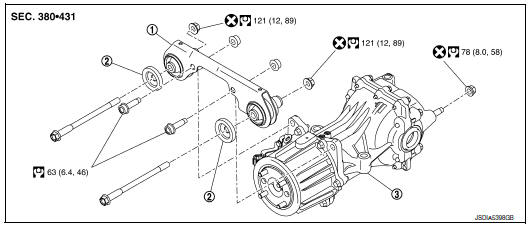
- Final drive mounting bracket
- Mounting stopper
- Rear final drive assembly
 : N·m (kg-m, ft-lb)
 : Always replace after every
disassembly.
: Always replace after every
disassembly.
Removal and Installation
REMOVAL
- Remove rear propeller shaft. Refer to DLN-99, "Exploded View".
- Remove rear drive shafts. Refer to RAX-19, "Exploded View".
- Disconnect AWD solenoid harness connector.
- Remove rear final drive breather hose and electric controlled coupling breather hose.
- Support final drive assembly with a suitable jack.
- Remove final drive nuts and final drive bolts with power tool.
If necessary, remove final drive bracket and washer with power tool.
CAUTION: Secure final drive assembly to a suitable jack while removing it.
INSTALLATION Installation is in the reverse order of removal.
- When oil leaks while removing final drive assembly, check oil level after the installation. Refer to DLN-111, "Inspection".
- When replacing rear final drive assembly, perform writing unit characteristics. Refer to DLN-35, "Work Procedure".
 Removal and installation
DRIVE PINION OIL SEAL
Exploded View
Rear final drive assembly
Drive pinion oil seal
Electric controlled coupling assembly
Oil seal lip
Always replace after every
disassembly.
: ...
 Unit disassembly and assembly
ELECTRIC CONTROLLED COUPLING
Exploded View
Stud bolt
Connector bracket
Reamer bolt
Electric controlled coupling assembly
Wave spring
Drive pinion oil seal
Drive pinion lock nut ...
Other materials:
P1226 TP sensor
DTC Description
DTC DETECTION LOGIC
DTC No.
CONSULT screen terms
(Trouble diagnosis content)
DTC detecting condition
P1226
CTP LEARNING-B1
(CTP LEARNING-B1)
Closed throttle position learning is not performed successfully,
repeatedly
POSSIBLE CAUSE
Elect ...
Parking brake switch signal circuit
Component Function Check
1.CHECK PARKING BRAKE SWITCH OPERATION
Check that brake warning lamp in combination meter turns ON/OFF when parking
brake is actuated.
Is the inspection result normal?
YES >> Inspection End.
NO >> Proceed to diagnosis procedure. Refer to WCS-45, " ...
Regulatory Information
FCC Regulatory information
CAUTION: To maintain compliance with
FCC’s RF exposure guidelines, use only the
supplied antenna. Unauthorized antenna,
modification, or attachments could damage
the transmitter and may violate FCC regulations.
Operation is subject to the follow ...
