
Nissan Rogue Service Manual: How to set srt code
Description
OUTLINE
In order to set all SRTs, the self-diagnoses as in the “SRT ITEM” table must have been performed at least once. Each diagnosis may require actual driving for a long period of time under various conditions.
SRT ITEM
The table below shows required self-diagnostic items to set the SRT to “CMPLT”.
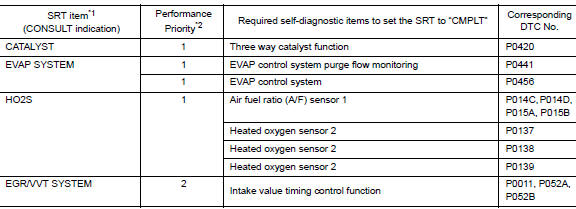
*1: Though displayed on the CONSULT screen, “HO2S HTR” is not SRT item.
*2: If completion of several SRTs is required, perform driving patterns (DTC
confirmation procedure), one by
one based on the priority for models with CONSULT.
SRT SERVICE PROCEDURE
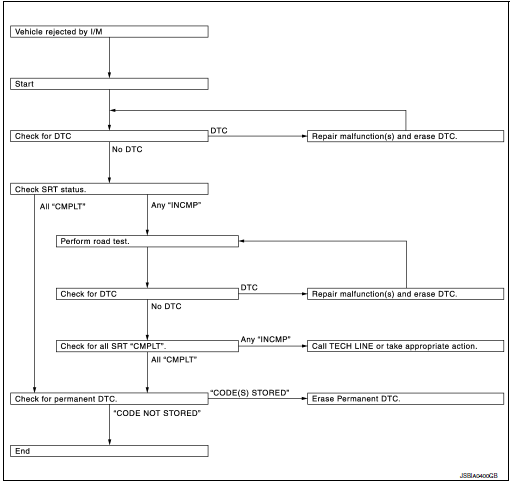
If a vehicle has failed the state emissions inspection due to one or more SRT items indicating “INCMP”, review the flowchart diagnostic sequence, referring to the following flowchart.
SRT Set Driving Pattern
CAUTION: Always drive the vehicle in safe manner according to traffic conditions and obey all traffic laws.
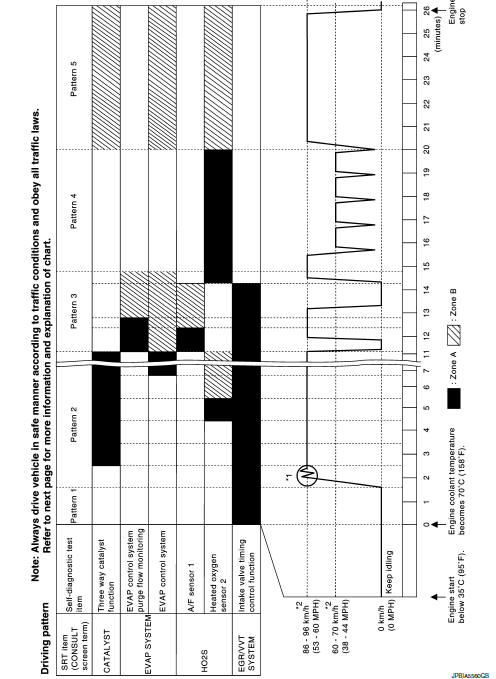
*1: Depress the accelerator pedal until vehicle speed is 90 km/h (56 MPH),
then release the accelerator pedal
and keep it released for more than 10 seconds. Depress the accelerator pedal
until vehicle speed is 90 km/h
(56 MPH) again.
*2: Checking the vehicle speed with GST is advised.
- The time required for each diagnosis varies with road surface conditions, weather, altitude, individual driving habits, etc.
- “Zone A” is the fastest time where required for the diagnosis under normal conditions*. If the diagnosis is not completed within “Zone A”, the diagnosis can still be performed within “Zone B”.
*: Normal conditions
- Sea level
- Flat road
- Ambient air temperature: 20 – 30°C (68 – 86°F)
NOTE: Diagnosis is performed as quickly as possible under normal conditions. However, under other conditions, diagnosis may also be performed. [For example: ambient air temperature other than 20 – 30°C (68 – 86°F)]
Work Procedure
1.CHECK DTC
Check DTC.
Is any DTC detected? YES >> Repair malfunction(s) and erase DTC. Refer to EC-93, "DTC Index".
NO >> GO TO 2.
2.CHECK SRT STATUS
 With CONSULT
Select “SRT STATUS” in “DTC & SRT CONFIRMATION” mode with CONSULT.
 Without CONSULT
Perform “SRT status” mode with EC-64, "On Board Diagnosis Function".
 With GST
Select Service $01 with GST.
Is SRT code(s) set? YES >> GO TO 11.
NO-1 >> With CONSULT: GO TO 3.
NO-2 >> Without CONSULT: GO TO 4.
3.DTC CONFIRMATION PROCEDURE
- Select “SRT WORK SUPPORT” in “DTC & SRT CONFIRMATION” mode with CONSULT.
- For SRT(s) that is not set, perform the corresponding “DTC CONFIRMATION PROCEDURE” according to the “Performance Priority” in the “SRT ITEM” table. Refer to EC-145, "Description".
- Check DTC.
Is any DTC detected? YES >> Repair malfunction(s) and erase DTC. Refer to EC-93, "DTC Index".
NO >> GO TO 10.
4.PERFORM ROAD TEST
- Check the “Performance Priority” in the “SRT ITEM” table. Refer to EC-145, "Description".
- Perform the most efficient SRT set driving pattern to set the SRT properly. Refer to EC-146, "SRT Set Driving Pattern".
In order to set all SRTs, the SRT set driving pattern must be performed at least once.
>> GO TO 5.
5.PATTERN 1
- Check the vehicle condition;
- Engine coolant temperature is −10 to 35°C (14 to 95°F).
- Fuel tank temperature is more than 0°C (32°F).
- Start the engine.
- Keep engine idling until the engine coolant temperature is greater than 70°C (158°F)
NOTE: ECM terminal voltage is follows;
- Engine coolant temperature
- −10 to 35°C (14 to 95°F): 3.0 – 4.3 V
- 70°(158°F): Less than 4.1 V
- Fuel tank temperature: Less than 1.4 V Refer toEC-77, "Reference Value".
>> GO TO 6.
6.PATTERN 2
- Drive the vehicle. And depress the accelerator pedal until vehicle speed is 90 km/h (56 MPH), then release the accelerator pedal and keep it released for more than 10 seconds.
- Depress the accelerator pedal until vehicle speed is 90 km/h (56 MPH) again
NOTE:
- Checking the vehicle speed with GST is advised.
- When steady-state driving is performed again even after it is
interrupted, each diagnosis can be conducted.
In this case, the time required for diagnosis may be extended.
>> GO TO 7.
7.PATTERN 3
- Operate vehicle following the driving pattern shown in the figure.
- Release the accelerator pedal during deceleration of vehicle speed from 90 km/h (56 MPH) to 0 km/h (0 MPH).
>> GO TO 8.
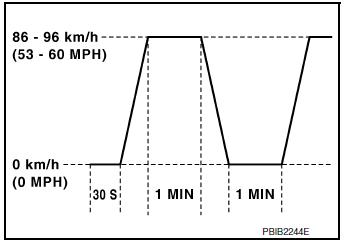
8.PATTERN 4
- Operate vehicle following the driving pattern shown in the figure.
- Drive the vehicle in a proper gear at 60 km/h (38 MPH) and maintain the speed.
- Release the accelerator pedal fully at least 5 seconds.
- Repeat the above two steps at least 5 times.
>> GO TO 9.
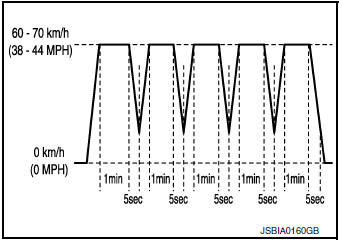
9.PATTERN 5
- The accelerator pedal must be held very steady during steady-state driving.
- If the accelerator pedal is moved, the test must be conducted again.
>> GO TO 10.
10.CHECK SRT STATUS
 With CONSULT
Select “SRT STATUS” in “DTC & SRT CONFIRMATION” mode with CONSULT.
 Without CONSULT
Perform “SRT status” mode with EC-64, "On Board Diagnosis Function".
 With GST
Select Service $01 with GST.
Is SRT(s) set? YES >> GO TO 11.
NO >> Call TECH LINE or take appropriate action.
11.CHECK PERMANENT DTC
NOTE:
Permanent DTC cannot be checked with a tool other than CONSULT or GST.
With CONSULT
Select “SRT STATUS” in “DTC & SRT CONFIRMATION” mode with CONSULT.
With GST
Select Service $0A with GST.
Is permanent DTC(s) detected? YES >> Proceed to EC-151, "Description".
NO >> END
 Fuel pressure
Work Procedure
FUEL PRESSURE RELEASE
1.FUEL PRESSURE RELEASE
With CONSULT
Turn ignition switch ON.
Perform “FUEL PRESSURE RELEASE” in “WORK SUPPORT” mode of “ENGINE” ...
 How to erase permanent DTC
Description
OUTLINE
When a DTC is stored in ECM
When a DTC is stored in ECM and MIL is ON, a permanent DTC is erased with MIL
shutoff if the same malfunction
is not detected after performing the ...
Other materials:
B1430 seat belt pre-tensioner
DTC Logic
DTC DETECTION LOGIC
CONSULT name
DTC
DTC detecting condition
Repair order
FRONT PRE-TEN LH CIRCUIT
[OPEN]
B1430
Front LH seat belt pre-tensioner circuit is
open.
Refer to SRC-59, "Diagnosis Procedure".
FRONT PRE-T ...
Anti-pinch system does not operate normally (driver side)
Diagnosis Procedure
1.PERFORM INITIALIZATION PROCEDURE
Initialization procedure is executed and operation is confirmed.
Refer to PWC-27, "ADDITIONAL SERVICE WHEN REMOVING BATTERY NEGATIVE TERMINAL :
Special
Repair Requirement".
Is the inspection result normal?
YES >> Insp ...
Starting the engine (models with NISSAN
Intelligent Key® system)
Apply the parking brake.
Move the shift lever to P (Park) or N (Neutral).
P (Park) is recommended.
The starter is designed not to operate if
the shift lever is in any of the driving
positions.
Push the ignition switch to the ON position.
Depress the brake pedal and pus ...
