
Nissan Rogue Owners Manual: Exterior and interior lights
| Item | Wattage (W) | Bulb No. | |
| Headlight assembly* | |||
| High | 65 | H9 | |
| Low | 55 | H11 | |
| Park | 5 | W5W | |
| Turn | 28/8 | 7444 | |
| Sidemarker | 5 | WY5W | |
| Front fog lights (if so equipped) | 55 | H11 | |
| Daytime running lights | — | — | |
| Map light (if so equipped)* | — | — | |
| Personal lights | 8 | P1Y | |
| Courtesy light* | — | — | |
| Vanity mirror light | 1.8 | AL1X | |
| Cargo light | — | — | |
| High-mounted stop light* | — | — | |
| Rear combination light | |||
| Tail/Stop* | 5/21 | 7443 | |
| Turn | 21 | WY21W | |
| Rear sidemarker | 5 | W5W | |
| Backup (reversing)* | 16 | W16W | |
| License plate light* | 5 | W5W | |
* See a NISSAN dealer for replacement. Always check with the Parts Department at a NISSAN dealer for the latest parts information.
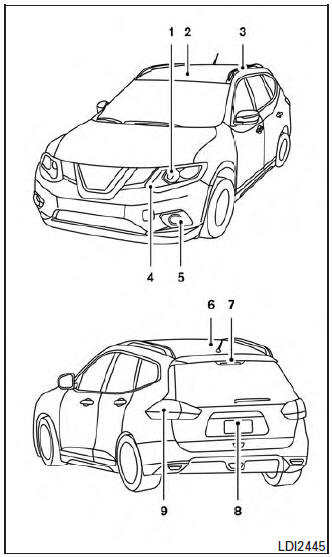
- Headlight assembly
- Map light (if so equipped)
- Personal light
- Daytime running light
- Fog light (if so equipped)
- Cargo light
- Courtesy light
- High mounted stoplight
- License plate light
- Rear combination light
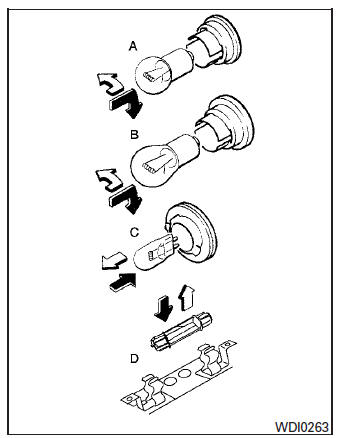
Replacement procedures
All other lights are either type A, B, C or D. When replacing a bulb, first remove the lens, lamp and/or cover.
 Indicates bulb removal
 Indicates bulb installation

Personal lights (if so equipped)
Use a cloth and a suitable tool 1 to protect the housing.
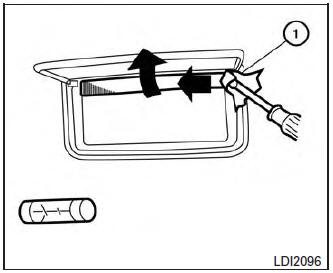
Vanity mirror
Use a cloth 1 and suitable tool to protect the housing.

Cargo light
Use a cloth 1 to protect the housing.
 Lights
Headlights
Replacing the halogen headlight bulb
(if so equipped)
The headlight is a semi-sealed beam type which
uses a replaceable headlight (halogen) bulb. Because
the headlight assembly must be ...
 Wheels and tires
If you have a flat tire, refer to “Flat tire� in
the “In case of emergency� section of this
manual for additional information. ...
Other materials:
Lumbar support switch
Exploded View
Seat cushion outer finisher
Lumbar support switch
Clip
Pawl
Removal and Installation
REMOVAL
Using a suitable tool release clips and remove seat cushion
outer finisher (1).
: Clip
Disconnect harness connector from lumbar support switch.
...
Vents
Side
Adjust air flow direction by moving the vent
slides.
Open or close the vents by using the dial. Move
the dial toward the to open the
vents or
toward the to close them.
Center
Rear ...
Diagnosis system (BCM) (without intelligent key system)
COMMON ITEM
COMMON ITEM : CONSULT Function (BCM - COMMON ITEM)
APPLICATION ITEM
CONSULT performs the following functions via CAN communication with BCM.
Direct Diagnostic Mode
Description
Ecu Identification
The BCM part number is displayed.
Self Diagnostic ...
