
Nissan Rogue Service Manual: Preparation
Special Service Tools
The actual shapes of TechMate tools may differ from those of special service tools illustrated here.
| Tool number (TechMate No.) Tool name | Description | |
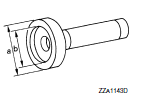
| KV38100200
(J-26233) Drift a: 65 mm (2.56 in) dia. b: 49 mm (1.93 in) dia. |
 |
|
| ST27861000
( — ) Drift a: 62 mm (2.44 in) dia. b: 52 mm (2.05 in) dia. |
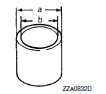 |
Installing drive pinion oil seal |
| ST35271000
(J-26091) Drift a: 72 mm (2.83 in) dia. b: 63 mm (2.48 in) dia. |
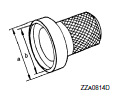 |
Installing drive pinion oil seal |
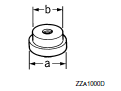
| KV40100610
(J-26089) Drift a: 63 mm (2.48 in) dia. b: 54.3 mm (2.138 in) dia. |
 |
|
| ST33052000
( — ) Adaptor a: 22 mm (0.87 in) dia. b: 28 mm (1.10 in) dia. |
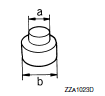 |
Removing side bearing inner race |
| KV40105020
( — ) Drift a: 39.7 mm (1.563 in) dia. b: 35 mm (1.38 in) dia. c: 15 mm (0.59 in) |
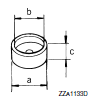 |
Installing side bearing inner race |
| KV38109500
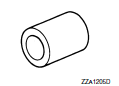
( — ) Drive pinion socket |
 |
|
| KV38109400
( — ) Pinion nut wrench |
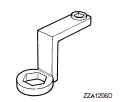 |
Removing and installing drive pinion lock nut |
| ST17130000
( — ) Drift a: 31.8 mm (1.252 in) dia. b: 58 mm (2.28 in) dia. |
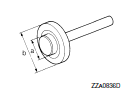 |
Installing pinion rear bearing outer race |
| ST33230000
(J-25805-01) Drift a: 51 mm (2.01 in) dia. b: 41 mm (1.61 in) dia. c: 28.5 mm (1.122 in) dia. |
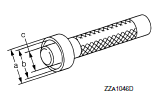 |
Installing pinion front bearing outer race |
| ST23860000
( — ) Drift a: 38 mm (1.50 in) dia. b: 33 mm (1.30 in) dia. |
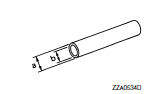 |
|
| ST38220000
( — ) Press stand a: 63 mm (2.48 in) dia. b: 65 mm (2.56 in) |
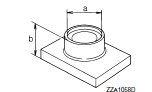 |
Installing pinion front bearing inner race |
| ST3127S000 (J-25765-A) Preload gauge | 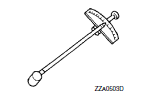 |
Measuring preload torque |
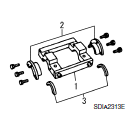
| KV381086S1
( — ) Dummy cover set 1. KV38108610 ( — ) Dummy cover 2. KV38108621 ( — ) Dummy cover spacer 3. KV38108630 ( — ) Dummy cover shim |
 |
|
Commercial Service Tools
| Tool name | Description | |
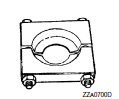
| Separator |
|
|
| Puller | 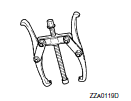 |
|
| Pin punch a: 4.5 mm (0.177 in) dia. |
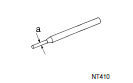 |
Removing and installing lock pin |
| Oil seal remover | 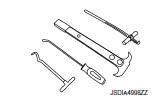 |
Removing drive pinion oil seal |
| Power tool | 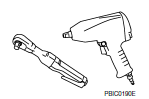 |
Loosening bolts and nuts |
 Precaution
Precaution for Supplemental Restraint System (SRS) "AIR BAG" and "SEAT
BELT
PRE-TENSIONER"
The Supplemental Restraint System such as “AIR BAG� and “SEAT BELT PRE-TENSIONE ...
 System description
STRUCTURE AND OPERATION
Sectional View
Drive gear
Side bearing
Differential case
Pinion mate shaft
Side gear
Pinion mate gear
Drive pinion
Collapsible spacer
AWD solenoi ...
Other materials:
P1148 closed loop control
DTC Description
DTC DETECTION LOGIC
DTC No.
CONSULT screen terms
(Trouble diagnosis content)
DTC detecting condition
P1148
CLOSED LOOP-B1
(CLOSED LOOP-B1)
The closed loop control function does not operate even when vehicle
is being
driven in the specified c ...
P0112, P0113 IAT sensor
DTC Description
DTC DETECTION LOGIC
DTC No.
CONSULT screen terms
(Trouble diagnosis content)
DTC detecting condition
P0112
IAT SEN/CIRCUIT- B1
(Intake air temperature sensor 1 circuit low
bank 1)
An excessively low voltage from the intake air temperature sensor ...
NISSAN Intelligent Key® (if so equipped)
Your vehicle can only be driven with the Intelligent
Keys which are registered to your vehicle’s Intelligent
Key system components and NISSAN Vehicle
Immobilizer System components. As many
as four Intelligent Keys can be registered and
used with one vehicle. The new keys must be
registered b ...
